
How to Create a Month of Social Media Content From One Website
You do not need 30 new ideas from scratch. Your product pages, guides, FAQs, and brand story can become a useful month of posts when you plan the angles, formats, and schedule together.
Many businesses already have enough material for a social calendar. It is sitting on their website: the questions a service page answers, the details on a product listing, the examples in a blog post, and the story on the About page. The hard part is turning that material into a sequence of posts people will actually want to see.
This guide gives you a 30-post planning framework, a complete example calendar, and a way to review and schedule the drafts. Thirty ideas can fill a daily calendar, or you can publish fewer times each week and stretch the same plan across more than one month.
Choose five or six strong pages from one website. Extract several distinct angles from each: a tip, customer problem, example, question, process, or product use case. Arrange 30 ideas so educational, trust-building, and offer-related posts alternate. Adapt the writing and visuals for each platform, check every claim and link, then schedule at a pace you can maintain. PostDovo’s Generate Campaign can discover and select website pages, set campaign duration and posting days, create editable drafts, and schedule the reviewed campaign.
For this example, we will create 30 distinct post ideas. One per day gives you a 30-day calendar. Posting five times a week gives you six weeks of ideas. A smaller business might choose twelve well-made posts for four weeks and keep the rest as a draft bank.
Separate the number of ideas from the number of published posts. If you adapt one idea for Instagram and LinkedIn, that is one core idea but two platform-specific posts. If you publish it twice with exactly the same hook and image, it may feel repetitive. Decide your channels and frequency before generating a campaign, because the total can grow quickly across platforms.
Simple planning math: 6 source pages × 5 genuinely different angles = 30 ideas. It is a starting framework, not a quota for every page. Some pages can support eight useful posts; others support only one.
Choose six useful pages from one website
Pick pages with specific, current information. For the example calendar below, imagine a small homeware shop with a mug and a candle, a care guide, an FAQ, an About page, and a gift guide. A service business can replace the product pages with service and process pages.
| Source page | What it can contribute | Check before using it |
|---|---|---|
| Product or service page A | Use cases, features, who it helps | Current details and real imagery |
| Product or service page B | Another problem or audience need | Correct variant and offer |
| How-to or blog guide | Tips, steps, misconceptions | Advice is still accurate |
| FAQ | Questions before buying or booking | Policies and answers are current |
| About or process page | Founder story, values, behind-the-scenes decisions | Names and claims are approved |
| Collection, comparison, or gift guide | Selection help and browsing ideas | Items remain available |
Do a quick audit before drafting: note each page URL, the strongest fact, a suitable image, and a reader question it answers. If the page is vague or outdated, fix the source first. A social generator cannot reliably invent product specifications, customer proof, or a service process that the site does not explain.
| Angle | Question to ask of a page | Example post |
|---|---|---|
| Problem | What situation brought the reader here? | “Which mug size fits your usual coffee?” |
| Practical tip | What useful step can stand alone? | One care tip from the published guide |
| Question | What does a customer ask before deciding? | Answer a real shipping or material FAQ |
| Use case | When would someone use this? | A truthful product-in-context photo |
| Process or story | Why was it made or how does it work? | A founder or service-process explanation |
| Next step | Where should interested readers go? | Visit the relevant guide, listing, or booking page |
Apply the angles selectively. An FAQ page may yield several helpful answers but no founder story. A product page may yield many use cases but no customer testimonial. Every post should have a traceable source and a clear purpose.
From a fictional ceramic mug listing
“The desk setup you actually enjoy using starts with the little things. Here is our ceramic mug in a quiet morning routine.”
“Looking for the right size? The product page lists the mug’s capacity and dimensions so you can check it against your everyday coffee.”
“How should you care for a ceramic mug? Follow the instructions on the listing before choosing your usual cleaning routine.”
These are illustrative drafts. A real store should replace the generic references with verified product facts and its actual photos. The same source can produce more than one post because the reader’s question changes.
Example: a 30-day social media content calendar
Use this as an editable template. The “source” column tells you where to get the facts. Each prompt describes a distinct post, not a finished caption to publish without checking your site. The example assumes a homeware store; substitute your own pages and preferred platforms.
| Day | Website source | Post idea |
|---|---|---|
| 1 | About page | Why the business started and who it serves |
| 2 | Mug product page | One everyday use case with the real product photo |
| 3 | Care guide | One practical care tip readers can save |
| 4 | FAQ | Answer the most common pre-purchase question |
| 5 | Candle product page | Explain one verified scent or material detail |
| 6 | Gift guide | Help someone choose between two listed items |
| 7 | About page | Show a real behind-the-scenes decision |
| 8 | Care guide | Correct a common mistake the guide addresses |
| 9 | Mug product page | Show size, color, or another confirmed option |
| 10 | FAQ | Explain how an order or booking step works |
| 11 | Candle product page | Show the actual product in a relevant setting |
| 12 | Gift guide | Make a short checklist for choosing a gift |
| 13 | About page | Tell the story behind one brand choice |
| 14 | Care guide | Turn a three-step process into a carousel outline |
| 15 | FAQ | Answer a shipping, returns, or availability question accurately |
| 16 | Mug product page | Show what comes with the item, if the listing says so |
| 17 | Gift guide | Make a choice guide for two different recipients |
| 18 | Candle product page | Explain who might enjoy the listed scent profile |
| 19 | Care guide | Answer “what should I avoid?” using the published instructions |
| 20 | About page | Introduce a real person or part of the process |
| 21 | FAQ | Invite questions after answering one frequent concern |
| 22 | Mug product page | Compare available variants without inventing differences |
| 23 | Gift guide | Show one pairing from products that are currently available |
| 24 | Care guide | Turn a single instruction into a short demonstration script |
| 25 | Candle product page | Answer a practical product-use question |
| 26 | About page | Explain one value through a concrete business decision |
| 27 | FAQ | Clarify a policy in plain language |
| 28 | Mug product page | Show a second use case for a different audience |
| 29 | Gift guide | Link to the guide with a helpful selection tip |
| 30 | Best-performing source | Revisit a useful topic with a new question or format |
There are many helpful posts and several clear product opportunities in the sequence. Day 30 depends on what you learn during the month. If you plan everything before publishing starts, leave that slot as a flexible draft rather than pretending you already know which topic will perform best.
Publishing less often? Choose the best 12 to 20 ideas from this table and schedule them across four weeks. Keep the remaining ideas for stories, another channel, or the following month. Quality and consistency matter more than filling every date.
How to turn the calendar into publishable posts
Map each idea to a source URL
Put the source page beside each calendar item. If a planned post has no reliable page, replace the idea or gather the missing facts. This keeps the month grounded in what the business actually offers.
Batch by source, then arrange by audience need
Draft all useful angles from a page while its details are fresh. Afterward, distribute them through the calendar so the same product or message does not dominate several days in a row.
Adapt each post to its destination
A product photo and short caption may suit Instagram; a searchable visual can suit Pinterest; a founder decision may work on LinkedIn. Keep the facts consistent, but change the hook, format, visual crop, and CTA for each platform. Video ideas still need real footage or an appropriate production step.
Review the entire sequence
Read the calendar in order. Remove repeated hooks, unsupported claims, expired offers, mismatched product images, and links that lead to the wrong page. Get permission before using a customer story or review. Leave room to react to genuine questions that arise during the month.
Schedule in manageable batches
Set the publishing days and timezone, preview the posts, and schedule the reviewed set. You can prepare a full month and still check it weekly for stock, promotions, policy changes, or news that affects the message.
PostDovo Generate Campaign starts with Website URL or Topic / Niche. For this plan, choose Website URL so the content can come from your existing pages. Select the connected social accounts and the post format. When exact product imagery matters, choose website images; when you need new conceptual creative, review the available AI image option and check it against the source.
- Set the campaign duration and publishing days. Choose a month-length plan and the days on which you actually want posts. Set posts per day. Check the displayed posts per platform and total posts before generating.
- Select the relevant pages. Choose product, service, guide, FAQ, and other useful pages from the discovered list. You can add a specific URL manually if it was not found.
- Review the usage summary. The configuration can involve post generation, fetching website images, or AI image generation. Check the displayed usage before proceeding.
- Generate and edit the campaign. Open the posts together, review the text and visual in each platform preview, and revise repeated or inaccurate drafts. One page can support several angles when the plan calls for more posts than selected pages.
- Schedule the approved work. Schedule individual posts or the prepared campaign, then use the Publishing Calendar to inspect upcoming activity and make changes.
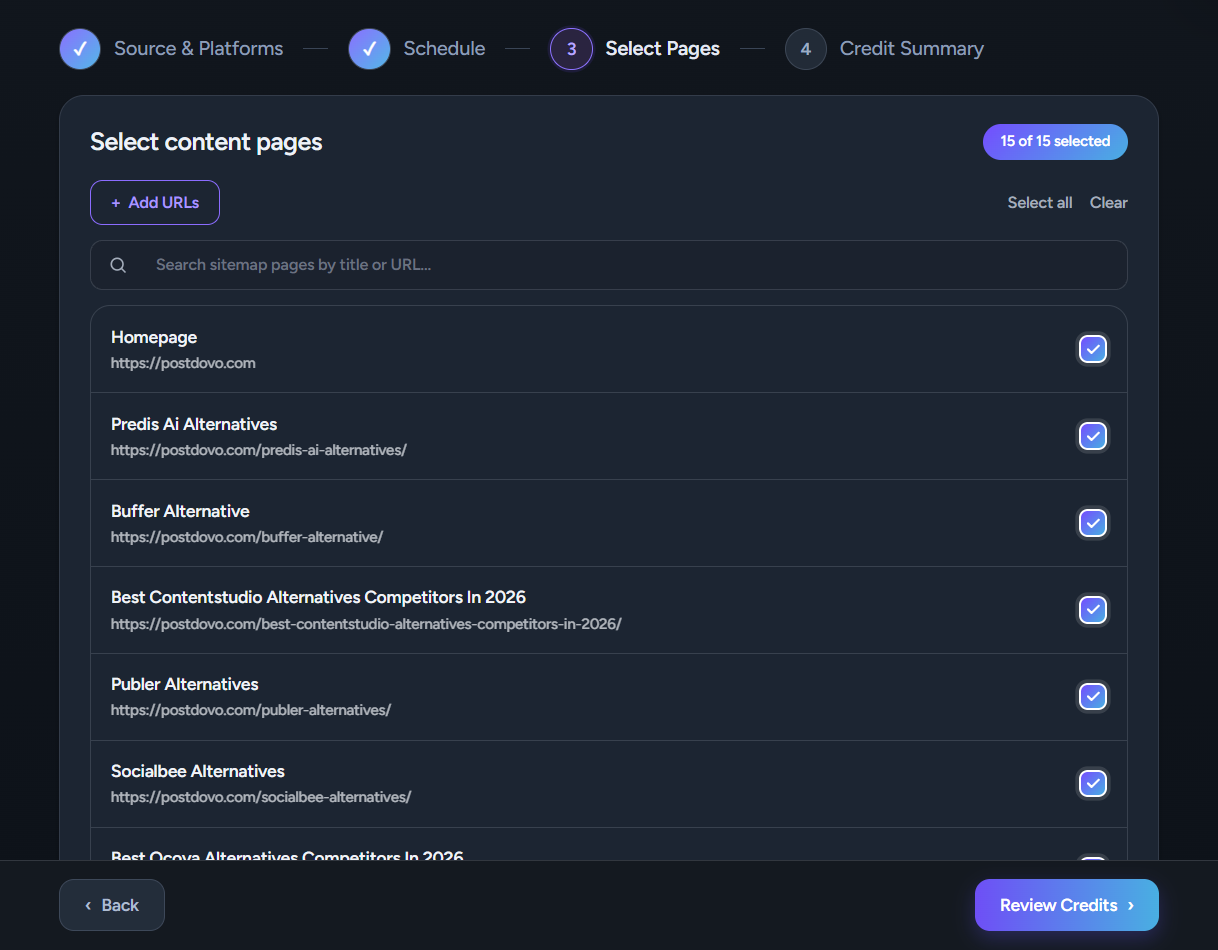
The guest experience is a small test of this workflow: it currently supports up to four Text Only or Text + Image posts without signup. It does not provide a full 30-post month in guest mode. Test a few pages and review the drafts first, then use the full campaign options if you want to build a longer schedule.
How to improve the next month
A prepared month saves drafting time, but the calendar should remain editable. Each week, check whether source pages, stock, prices, policies, and links still match the scheduled posts. Swap a draft when customers ask a more urgent question.
At the end of the month, look beyond likes. Which posts brought relevant visits to product or service pages? Which earned saves or useful questions? Which topics were ignored despite a strong visual? Group results by angle and source page, then carry the best questions into the next calendar.
Do not conclude that every post from a weak-performing page is useless. The hook, visual, channel, or timing may have been the problem. Test a clearer version when the underlying customer question still matters.
Build the month from what you already know
Your website gives you a set of source pages. The calendar gives each page a different job: teach, answer, demonstrate, tell a story, or help someone decide. Thirty ideas are possible without posting the same promotion thirty times.
Start with a few accurate pages and a sustainable schedule. Review every draft, then use customer questions and results to shape the next month.
Frequently asked questions
Can one website provide a full month of social media content?
Yes, if it has enough specific, current material. A mix of product or service pages, articles, FAQs, and brand stories can support many different angles. The number of useful posts depends on the quality and variety of those pages.
How many website pages do I need for 30 posts?
Five or six substantial pages can be a practical starting point if each supports several distinct questions or use cases. Do not force five posts from a thin page. Add another source or publish fewer, stronger posts when necessary.
Do I need to post every day to have a month of content?
No. A four-week plan might contain 12, 16, or 20 scheduled posts, depending on your audience and capacity. The 30 ideas in this guide are a flexible bank you can use at your preferred pace.
Can AI create a month of posts from my website automatically?
A tool can analyze selected pages and generate a campaign, but the drafts still need a human review for factual accuracy, repetition, visuals, links, and platform fit. PostDovo supports website-based campaign generation and scheduling.
Can one page become more than one social post?
Yes. A detailed page may provide a tip, a customer question, a use case, a process explanation, and a link-led post. Each should answer a different need rather than repeat the same caption.
How do I keep 30 posts from sounding repetitive?
Mix page types and post purposes. Alternate helpful advice, FAQs, product or service details, stories, and relevant next steps. Review the whole calendar in order before scheduling it.
Can I generate a full month for free in PostDovo?
The current signup-free guest workflow generates up to four Text Only or Text + Image posts. It is useful for testing with your own website; a 30-post campaign goes beyond that guest limit. Check the full campaign options and displayed usage for a longer plan.
Should I use the same caption on every platform?
Keep the source facts consistent, but adapt the opening, length, visual, link placement, and CTA to each destination. One core idea can have different platform-specific versions.