
How to Connect ChatGPT to PostDovo for Free (Web & Desktop)
Create, schedule, and publish social media posts with PostDovo using ChatGPT on the web or in the desktop app.
Connect ChatGPT to PostDovo and manage your social media content through simple conversations. The same custom MCP server and OAuth setup is available through ChatGPT.com and ChatGPT Desktop. Tell ChatGPT what to post, which platforms to use, and when to publish.
ChatGPT integration is available on every PostDovo plan, including the free Starter plan at $0/month.
How to Connect ChatGPT on Web or Desktop in 5 Simple Steps
PostDovo connects with ChatGPT through the Model Context Protocol (MCP). The five steps below work for both ChatGPT.com and the desktop app. The screenshots show the web interface, but the settings and OAuth process are the same. For the desktop menu location, see the short desktop note.
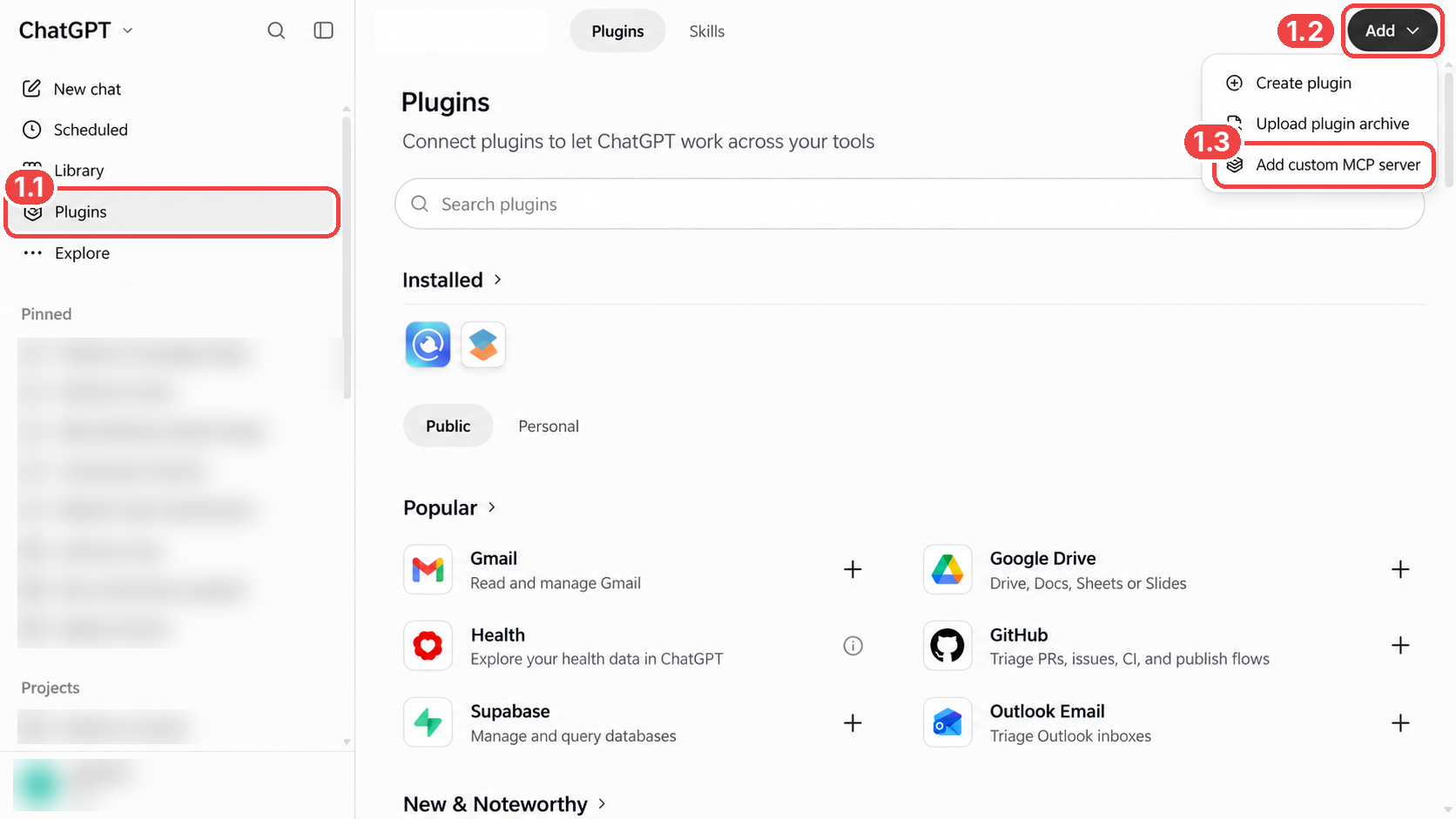
Open ChatGPT Plugins
Open ChatGPT.com or the ChatGPT Desktop app. Both offer the Plugins setup.
- 1.1Select Plugins from the ChatGPT sidebar.
- 1.2Click Add in the top-right corner.
- 1.3Select Add custom MCP server.
Add the PostDovo MCP Server
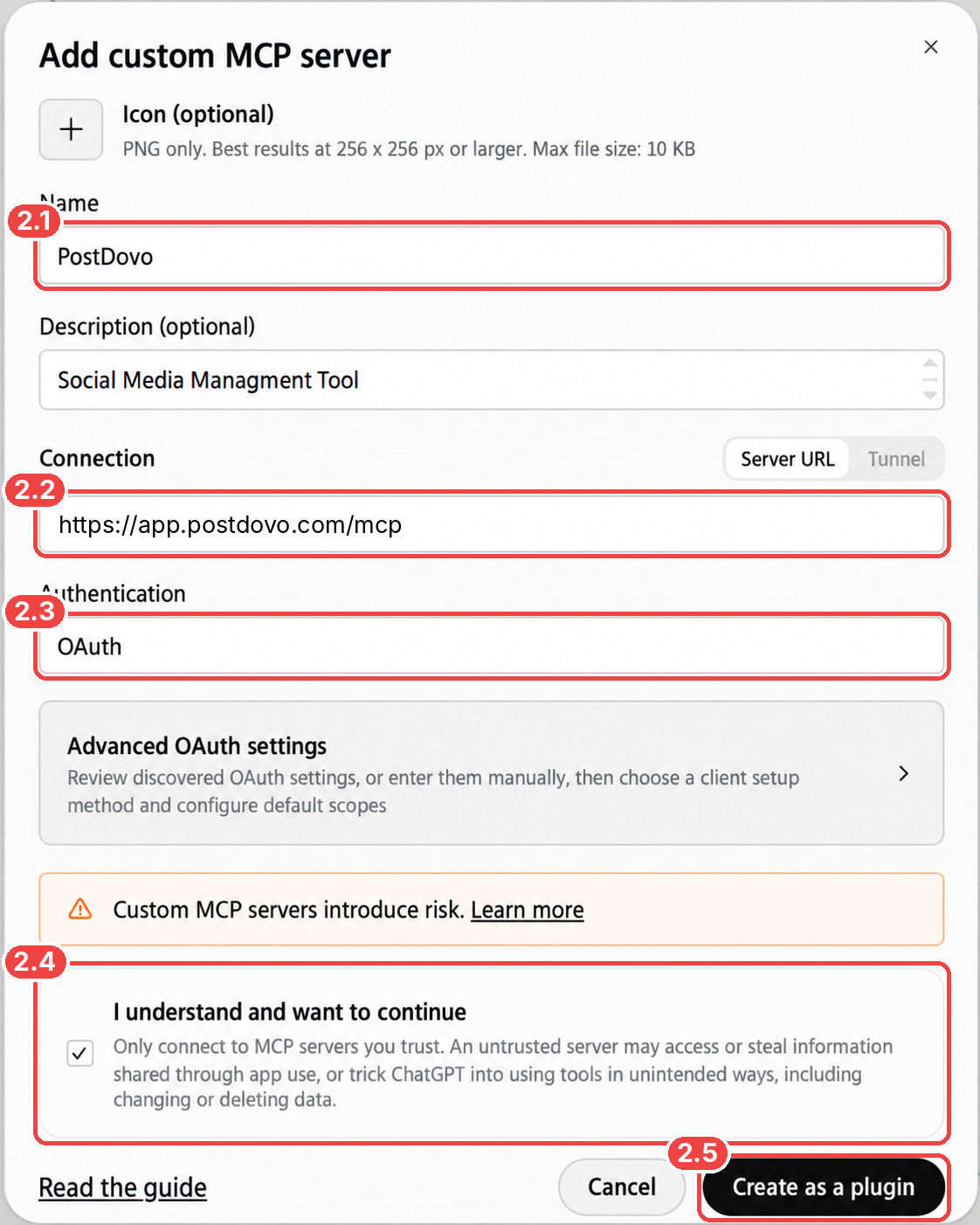
Enter the following details in the custom MCP server form:
| Field | Value |
|---|---|
| Name | PostDovo |
| Description (optional) | Social Media Management Tool |
| Connection Type | Server URL |
| Server URL | https://app.postdovo.com/mcp |
| Authentication | OAuth |
- 2.1Enter PostDovo as the name.
- 2.2Paste the PostDovo MCP server URL.
- 2.3Select OAuth authentication.
- 2.4Review the security information and select I understand and want to continue if you agree.
- 2.5Click Create as a plugin.
Connect PostDovo to ChatGPT
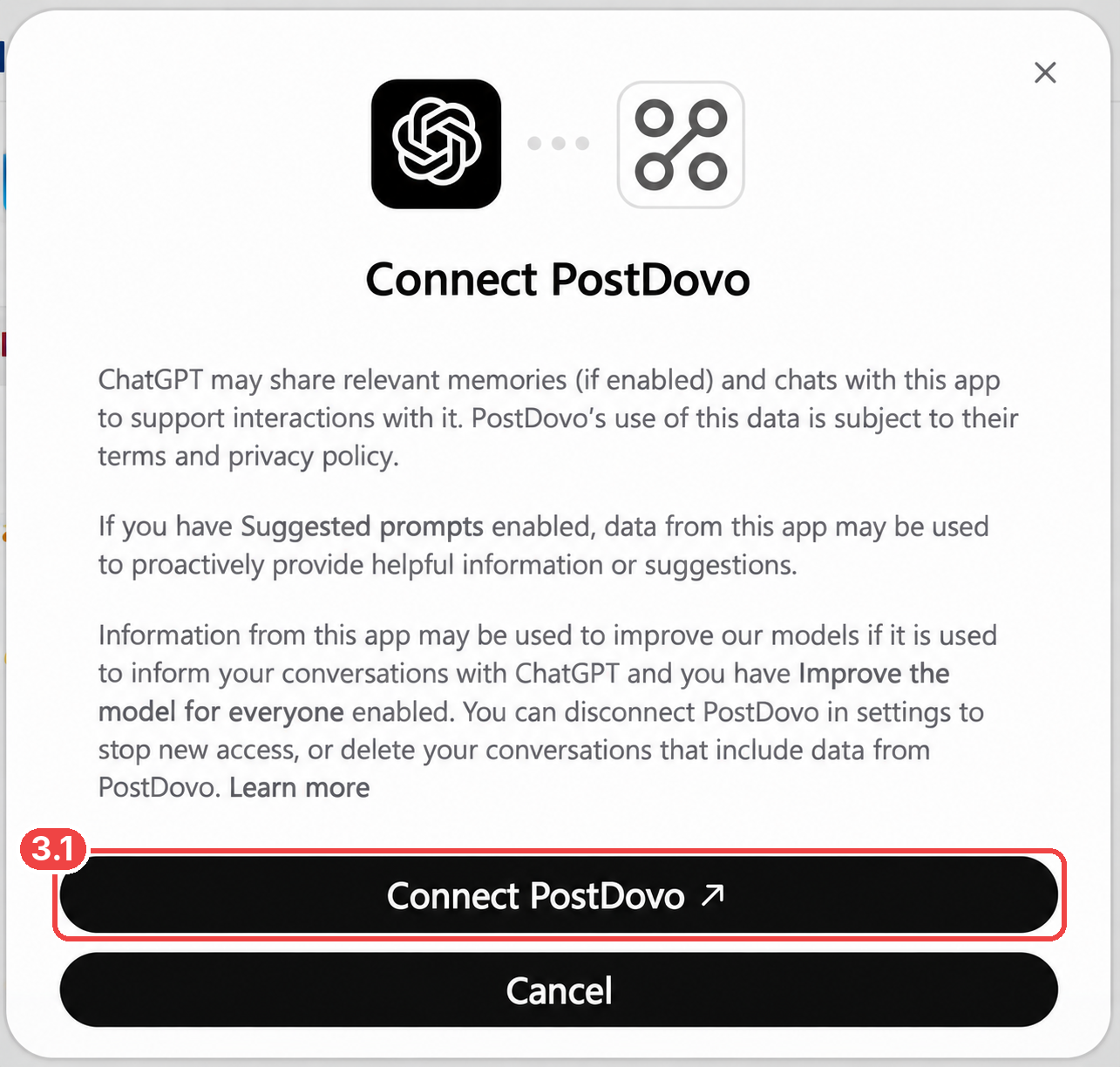
ChatGPT will display a connection confirmation window.
- 3.1Click Connect PostDovo to continue to authorization.
Approve ChatGPT Access
PostDovo displays the permissions requested by ChatGPT. Supported actions include viewing workspaces and posts, managing drafts, attaching media, scheduling content, and publishing after your approval.
- 4.1Review the permissions, then click Approve to authorize ChatGPT.
You will return to ChatGPT once authorization is complete.
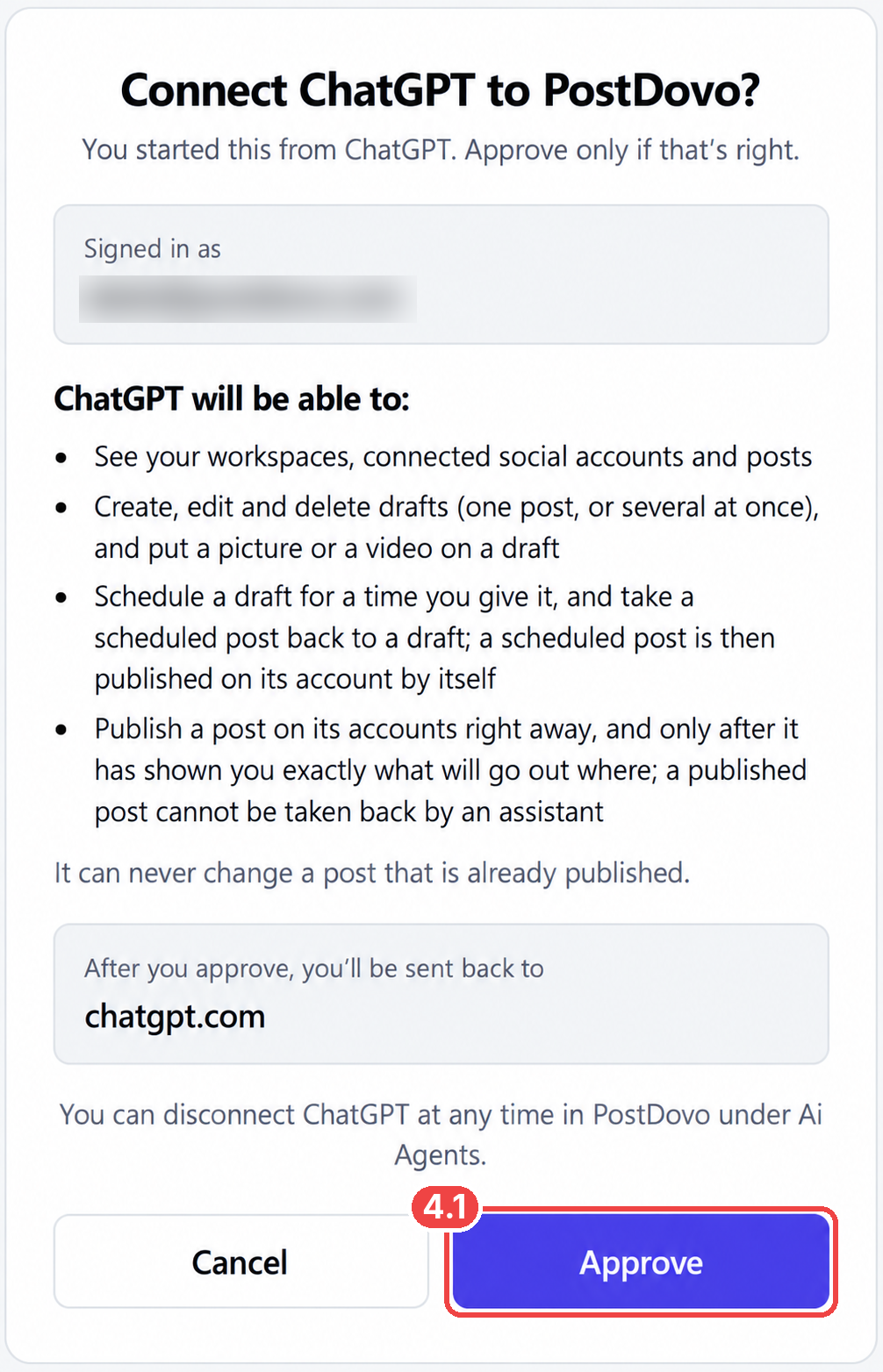
You can disconnect ChatGPT at any time from the AI Agents section in PostDovo. Published posts cannot be changed through this integration once they are live.
Start Using PostDovo in ChatGPT
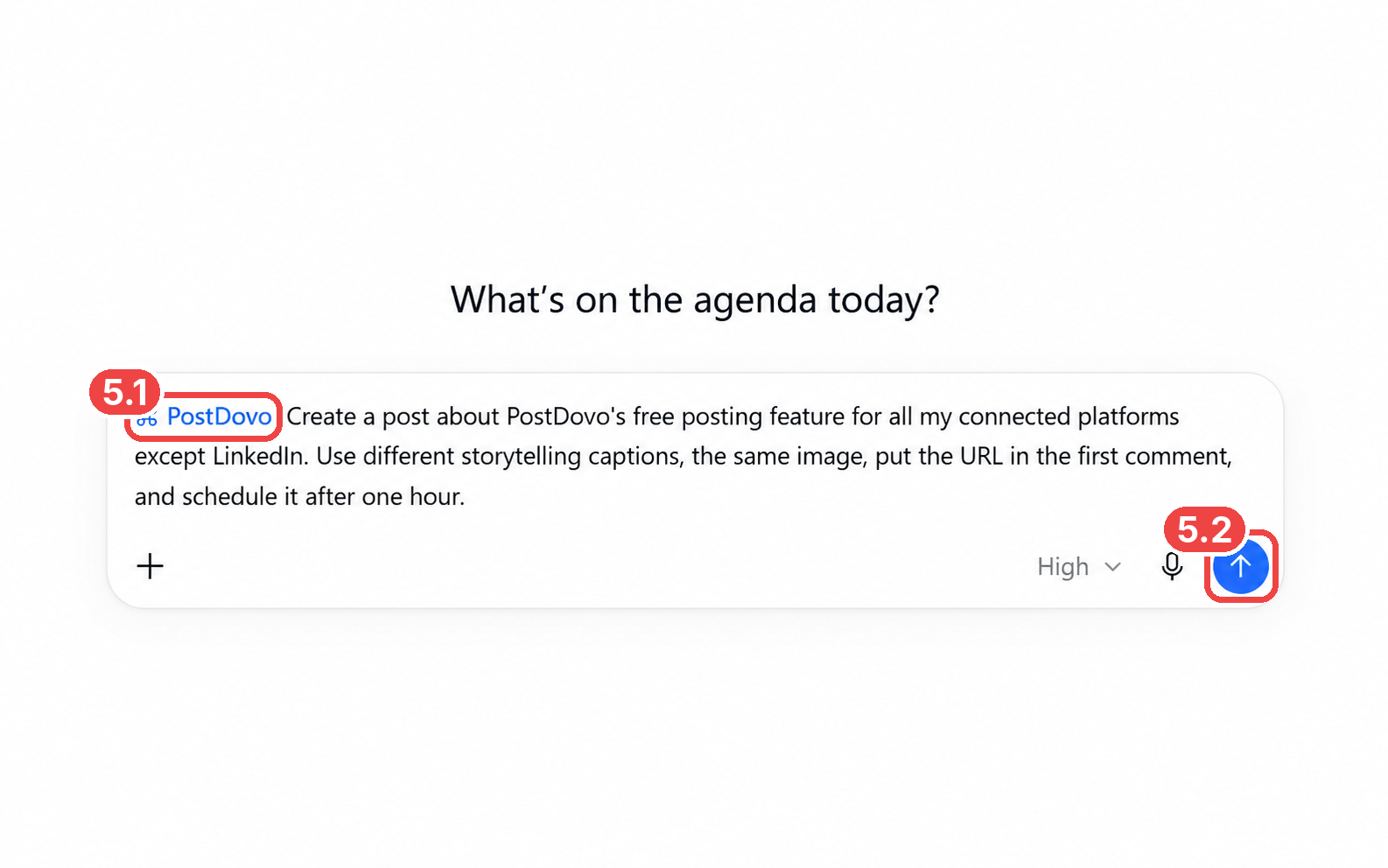
- 5.1Open a ChatGPT conversation and select or reference PostDovo.
- 5.2Describe the social media task you want ChatGPT to perform and send your message.
- 5.3Review the results and approve any required publishing actions.
Does PostDovo Work with ChatGPT Desktop (Formerly Codex)?
Yes. In the ChatGPT Desktop app, open Customize → Plugins → Add → Add custom MCP server. The form uses the same PostDovo server URL and OAuth authentication as ChatGPT.com.
Follow the same server configuration (Step 2), connection (Step 3), approval (Step 4), and first post (Step 5) instructions above. The existing screenshots illustrate both versions, so no separate desktop screenshots or second setup are needed.
How to Use PostDovo with OpenAI Dots
OpenAI Dots is an always-on AI agent in ChatGPT that can work on ongoing tasks using connected plugins. If you’ve already connected PostDovo in ChatGPT, your dot can use that existing plugin connection and its granted permissions. You don’t need to enter the PostDovo MCP URL or repeat OAuth authorization just for Dots.
- Follow the five connection steps above to add and authorize PostDovo through ChatGPT Plugins.
- Open your dot, if Dots is available on your ChatGPT account, and ask it to use the connected PostDovo plugin.
- Start with a read-only check, such as “Using PostDovo, show my connected social accounts and scheduled posts.” Then request a draft or schedule for review.
Your dot’s available actions depend on its permissions and approval controls. Review publishing actions before authorizing them. Dots access itself depends on OpenAI’s eligibility and plan requirements; PostDovo Starter remains $0/month.
For more on shared plugin access, see OpenAI’s Dots permissions guide.
Watch: How to Connect ChatGPT to PostDovo
Prefer watching the process? Follow the video guide from MCP setup through authorization and your first ChatGPT request.
See where to click, which MCP URL to enter, and how to authorize PostDovo.
Try Your First ChatGPT Prompt with PostDovo
This example requests three platform-specific draft posts for Zizta. Copy it into ChatGPT after connecting PostDovo, or adapt the business and link for your own account.
Example: Prepare Draft Posts for Zizta
Using PostDovo, create three social media posts promoting the zizta.
Prepare posts for Facebook, Instagram, and LinkedIn. Write different captions for each platform, and use https://app.zizta.com as the comment. Save the posts as drafts for review.
What Will ChatGPT Do?
Using this prompt, ChatGPT can ask PostDovo to prepare three posts for Facebook, Instagram, and LinkedIn, customize each caption for the platform, include the requested Zizta link as a comment where supported, and save the posts as drafts for review.
Replace the business name and link in the prompt with your own. Review the captions and comments before approving any future publishing action.
What Can ChatGPT Do with PostDovo?
Use natural-language instructions to create content and manage supported social media publishing tasks.
| Capability | What You Can Do |
|---|---|
| Content Creation | Prepare posts with different captions for different platforms. |
| Media Attachments | Add supported images or videos to drafts. |
| Scheduling | Set publishing dates, times, and destinations. |
| Draft Management | Create, review, edit, and delete drafts. |
| Scheduled Posts | Review schedules and make supported changes before publishing. |
| Publishing | Publish to connected accounts after the required approval. |
| Account Visibility | View connected accounts and available workspaces. |
Available actions depend on your PostDovo connection, permissions, and each platform’s requirements.
Supported Social Media Platforms for ChatGPT Publishing
PostDovo supports 19 social media connection options for preparing, scheduling, and publishing content through its supported ChatGPT integration actions.
| Social Media Platform | Create Content | Schedule Posts | Publish Posts |
|---|---|---|---|
 Facebook | ✓ | ✓ | ✓ |
 Instagram (Facebook Business) | ✓ | ✓ | ✓ |
 LinkedIn | ✓ | ✓ | ✓ |
| LinkedIn Company Page | ✓ | ✓ | ✓ |
| Instagram (Standalone) | ✓ | ✓ | ✓ |
 X (Twitter)* | ✓ | ✓ | ✓ |
 Pinterest | ✓ | ✓ | ✓ |
 TikTok | ✓ | ✓ | ✓ |
 YouTube | ✓ | ✓ | ✓ |
 Bluesky | ✓ | ✓ | ✓ |
 Threads | ✓ | ✓ | ✓ |
 Mastodon | ✓ | ✓ | ✓ |
 Telegram | ✓ | ✓ | ✓ |
| Discord | ✓ | ✓ | ✓ |
 Dribbble | ✓ | ✓ | ✓ |
 LINE | ✓ | ✓ | ✓ |
 Nostr | ✓ | ✓ | ✓ |
 Lemmy | ✓ | ✓ | ✓ |
 Tumblr | ✓ | ✓ | ✓ |
* X (Twitter): Credits are required to publish posts on X, including scheduled posts. Other platforms do not have this X-specific publishing credit requirement. Connected accounts, supported post formats, and platform requirements still apply.
How to Connect Your Social Media Accounts
Before publishing with ChatGPT, connect the social accounts you want to use in PostDovo:
- Open your PostDovo workspace.
- Navigate to Connect Accounts.
- Choose your social platforms and complete each account’s authorization process.
Is ChatGPT Integration Free with PostDovo?
Yes. AI-agent connectivity is available on every PostDovo plan, including the free Starter plan at $0/month.
What’s Included in the Free Starter Plan?
| Feature | Starter Plan |
|---|---|
| Monthly Subscription | $0/month |
| Social Media Accounts | Up to 5 |
| Workspaces | 1 |
| Single Post Creation | Unlimited |
| Single Post Scheduling | Unlimited |
| Single Post Publishing | Unlimited, except X credit requirements |
| ChatGPT Integration | Included |
| Claude Integration | Included |
| Other Supported AI Agents | Included |
AI-agent connectivity is included with Starter, but AI content generation and other credit-based features may have separate usage limits. ChatGPT may also have its own account or feature-access requirements.
Frequently Asked Questions
1. Is ChatGPT integration with PostDovo free?
Yes. ChatGPT connectivity is included in all PostDovo plans, including Starter at $0/month. ChatGPT may have separate requirements for custom MCP connections.
2. Can I connect PostDovo in ChatGPT Desktop as well as ChatGPT.com?
Yes. In ChatGPT Desktop, open Customize → Plugins → Add → Add custom MCP server. On the web, open ChatGPT Plugins and use the same Add option. In either interface, enter https://app.postdovo.com/mcp, choose OAuth, and approve access through PostDovo.
3. Do I need a PostDovo account?
Yes. You must authorize a PostDovo account or workspace. You can use the free Starter plan without paying a monthly subscription.
4. Can ChatGPT create and schedule posts for multiple platforms?
Yes. Through PostDovo, ChatGPT can prepare platform-specific posts and schedule them for connected accounts, subject to supported integration actions.
5. Can ChatGPT publish posts with images and videos?
Yes. PostDovo supports attaching images and videos to drafts and publishing supported media formats where the destination platform allows them.
6. Which social media platforms are supported?
PostDovo provides 19 connection options, covering Facebook, Instagram, LinkedIn, X, Pinterest, TikTok, YouTube, Bluesky, Threads, Mastodon, Telegram, Discord, Dribbble, LINE, Nostr, Lemmy, and Tumblr.
7. Does publishing to X (Twitter) require credits?
Yes. Credits are required to publish posts on X, including posts scheduled through ChatGPT and PostDovo.
8. Do I need an API key to connect ChatGPT?
No manual PostDovo API key is required for this setup. The connection uses OAuth authentication.
9. Can I disconnect ChatGPT from PostDovo?
Yes. Open the AI Agents section in PostDovo to disconnect ChatGPT whenever you want.
10. Can OpenAI Dots schedule social media posts with PostDovo?
Dots can use the PostDovo plugin already connected through ChatGPT, subject to your Dots access, plugin permissions, and approval settings. Follow the same ChatGPT MCP setup above; no separate Dots installation is needed.
Start Creating and Publishing Social Media Posts with ChatGPT
Use ChatGPT on the web or in the desktop app to connect PostDovo, prepare platform-specific posts, manage drafts, schedule content, and publish approved posts across your connected social accounts.
Get started with Starter at $0/month. ChatGPT and other supported AI-agent integrations are included.