
How to Post to Social Media from Grok AI
Connect Grok to Instagram, Facebook, LinkedIn and more in five steps. Create drafts and schedule approved posts through PostDovo.
Grok can help write content. With PostDovo connected, it can also request supported publishing actions—without you copying every caption into another application.
AI-agent connectivity is included with PostDovo Starter at $0/month.
Can Grok Post to Instagram and Facebook?
Yes, through PostDovo’s supported publishing tools. Grok connects to PostDovo through the Model Context Protocol (MCP). PostDovo manages your separately authorized social accounts.
Connecting Grok does not automatically connect Instagram or Facebook. You’ll also need to authorize those accounts under PostDovo → Connect Accounts. This is why an MCP connection can succeed even when no publishing destinations appear.
How to Connect Grok to PostDovo in 5 Steps
The setup uses Grok’s graphical connector interface—no coding or local MCP server required. Sign in to Grok and make sure you have a PostDovo workspace.
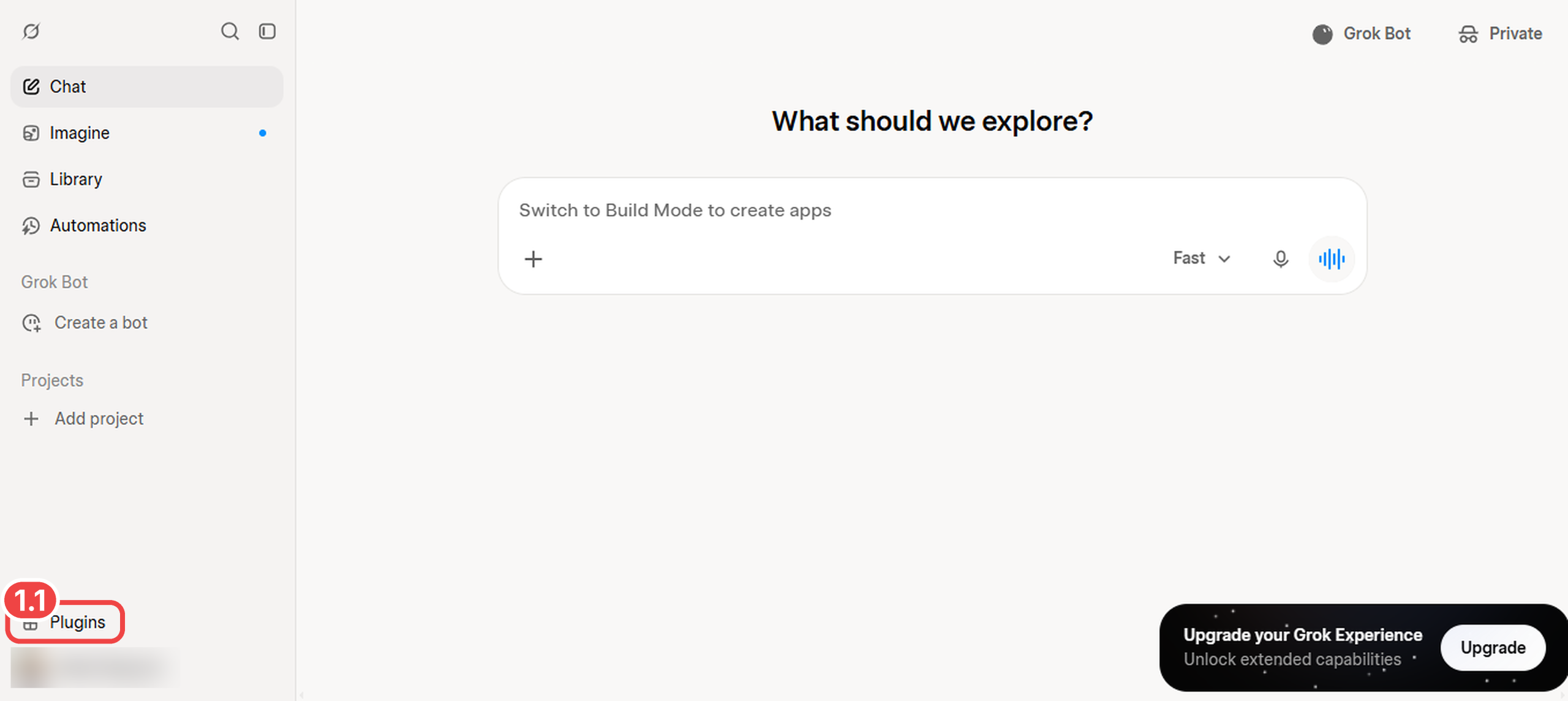
Open Plugins in Grok
- 1.1Click Plugins in Grok’s left sidebar.
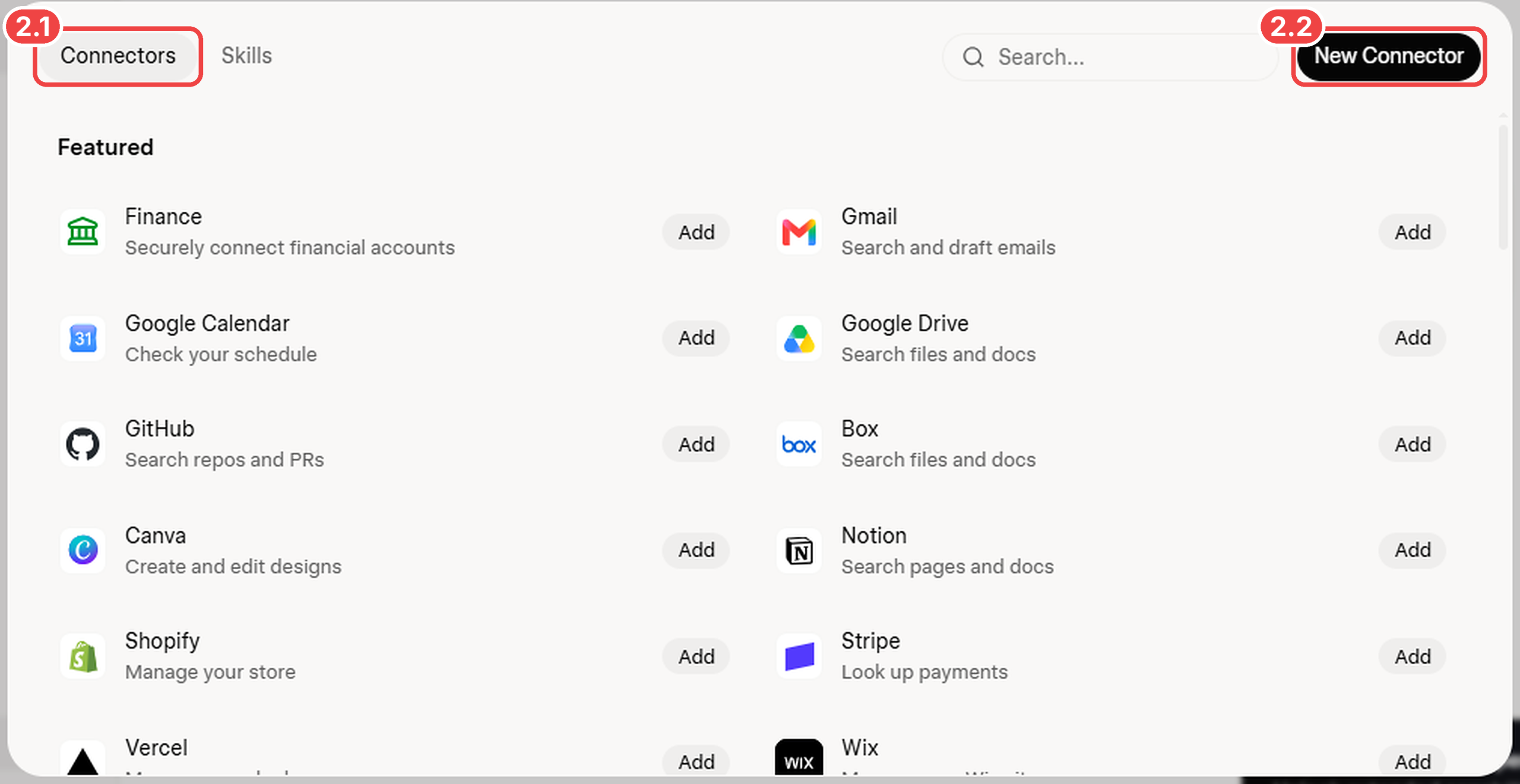
Open Connectors
- 2.1Select the Connectors tab.
- 2.2Click New Connector in the upper-right corner.
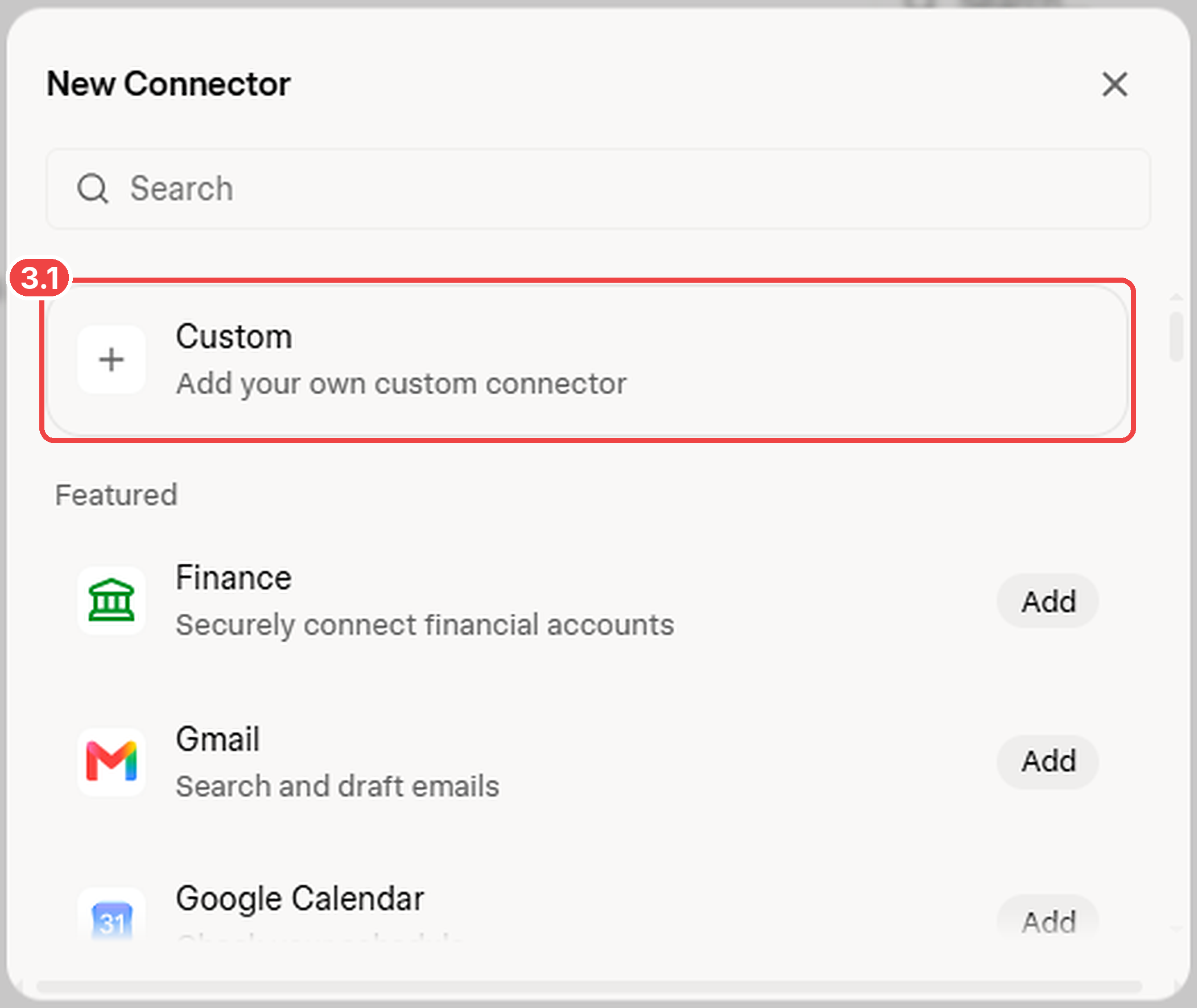
Choose a Custom Connector
- 3.1Select Custom — Add your own custom connector.
Grok supports hosted MCP services, so you can connect PostDovo without installing software on your computer.
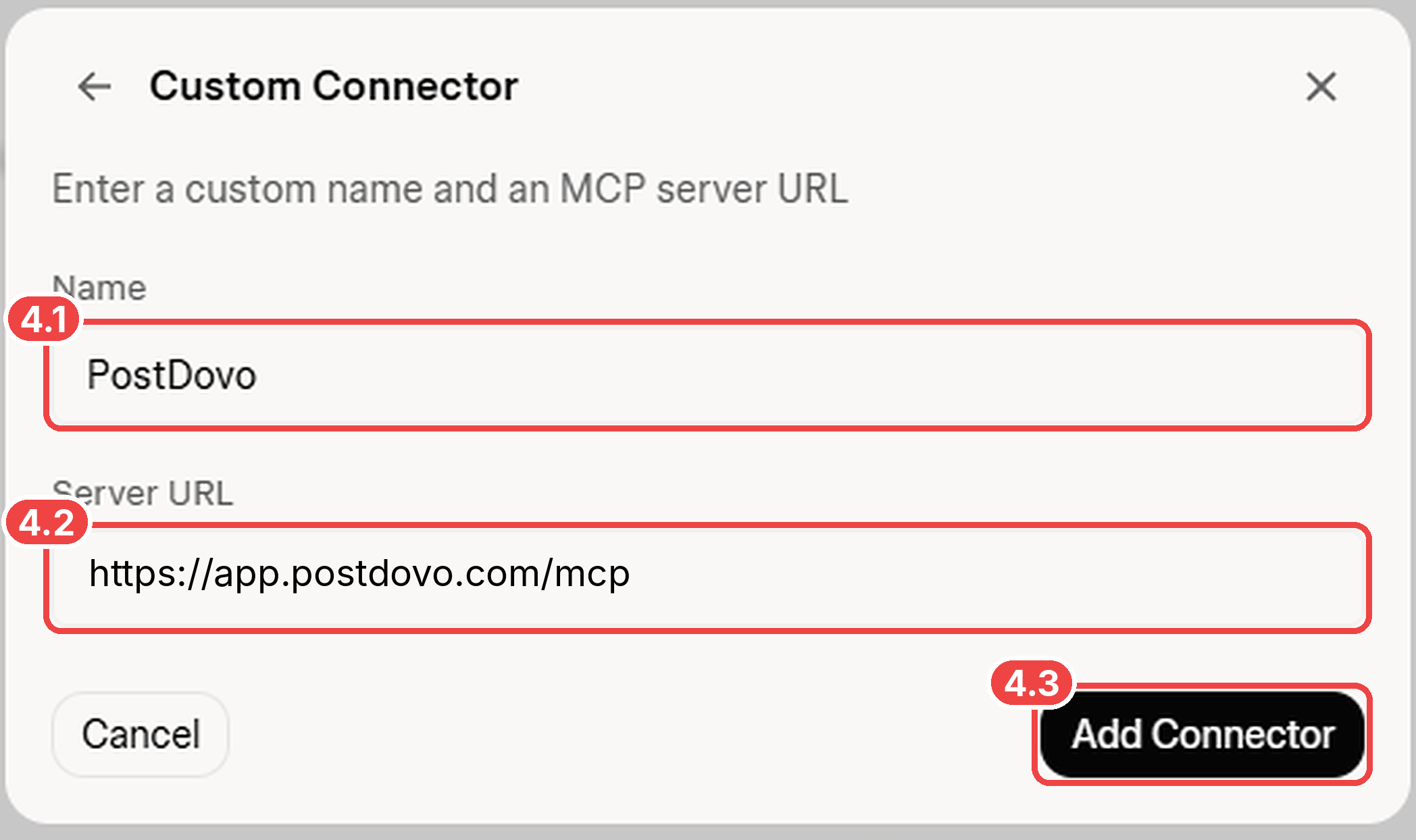
Enter PostDovo’s MCP Details
| Field | Enter |
|---|---|
| Name | PostDovo |
| Server URL | https://app.postdovo.com/mcp |
- 4.1Enter PostDovo.
- 4.2Paste the complete MCP server URL, including
/mcp. - 4.3Click Add Connector.
Review and Approve Access
PostDovo opens an OAuth authorization page. Review the requested permissions before proceeding. These include viewing workspaces and accounts, managing drafts, attaching supported media, scheduling, and publishing with the required approval.
- 5.1Click Approve if you authorize Grok to use the listed PostDovo tools.
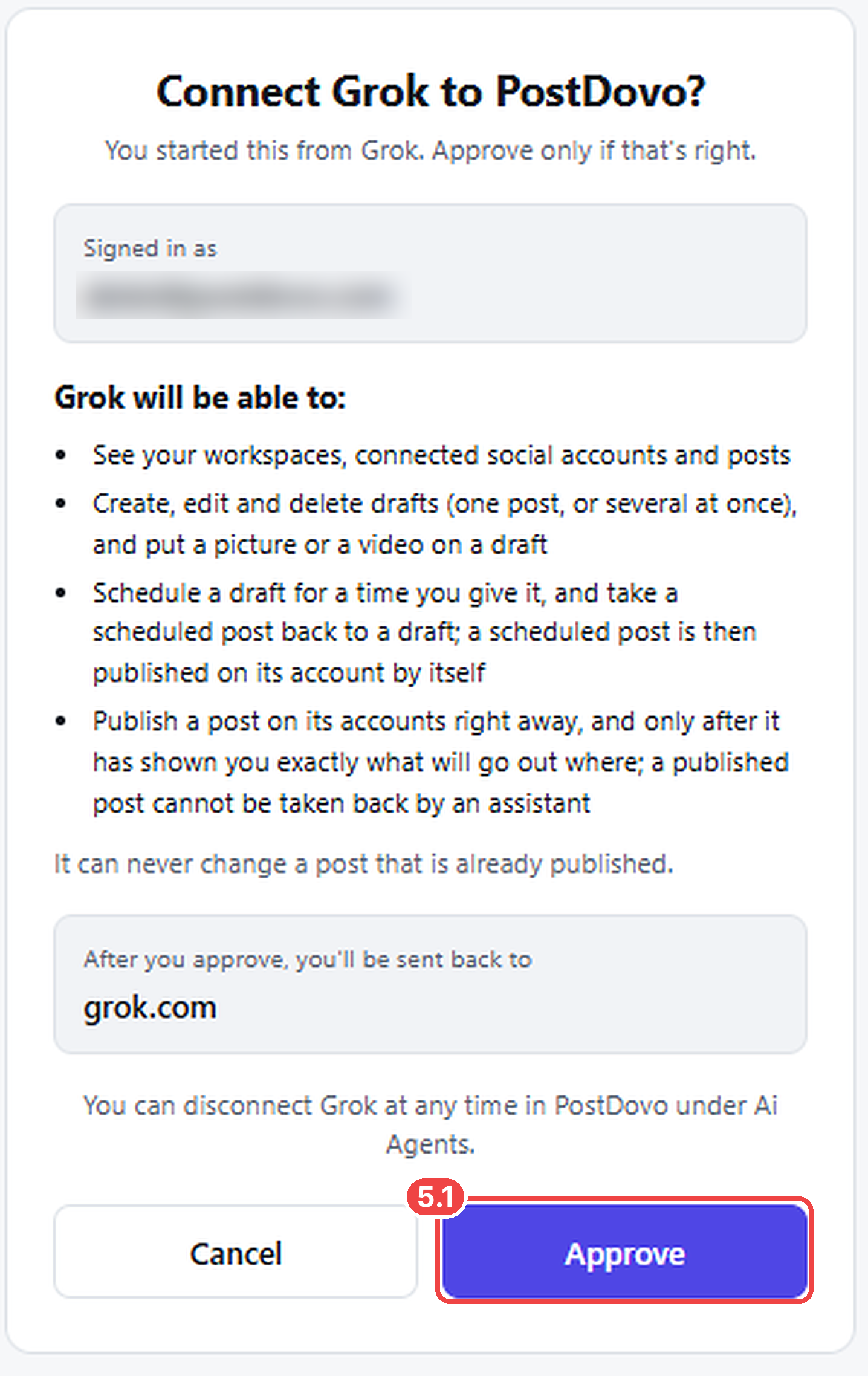
Approval is not immediate publication. The connector can access only the tools and permissions it is given; an immediate publishing action still requires the relevant preview and approval. Published posts cannot be edited through these tools.
Open a Grok conversation and send this read-only request:
If accounts are missing, confirm the correct workspace and social connections in PostDovo. The screenshots above document connector setup and authorization; they do not claim that a full publishing run has been completed.
Watch Grok Connect to PostDovo
Watch the custom MCP setup and OAuth approval without leaving this page.
Schedule Seven Days of Social Posts with Grok
Once connected, Grok can request a multi-day publishing plan through PostDovo. The example below specifies the accounts, dates, captions, and approval requirement so nothing is scheduled before you review it.
Using PostDovo, prepare 7 daily social media posts promoting https://postdovo.com.

Platforms: Facebook and Instagram.
Audience: Small business owners, freelancers, and content creators.

Highlight the $0/month Starter plan, up to 5 connected social accounts, unlimited Single Post creation and scheduling, and AI-agent connectivity.

Write a different caption for each platform. Use Text + Image posts with a different relevant image each day. If you cannot generate or attach suitable images using available tools, tell me what is missing.

Start tomorrow, one post per day at 7 PM in the Europe/London timezone. Keep all seven days in one group.

Show the complete plan, including dates, accounts, captions and media, before creating or scheduling anything. Wait for my approval.
What This Request Should Prepare
Expected from the prompt: one post per day per platform, at 7 PM Europe/London, with approval requested before execution. These are requested results, not evidence that Grok has already created them.
The tools described here support PostDovo’s Single Post workflow, including grouped posts. That is separate from the automated Generate Campaign feature.
Which Social Platforms Can Grok Publish To?
PostDovo offers 19 connection options. The table below reflects content creation, scheduling and publishing support for eligible connected accounts; media formats and required fields differ by platform.
| Social platform | Create | Schedule | Publish |
|---|---|---|---|
 Facebook | ✓ | ✓ | ✓ |
 Instagram (Facebook Business) | ✓ | ✓ | ✓ |
 LinkedIn | ✓ | ✓ | ✓ |
| LinkedIn Company Page | ✓ | ✓ | ✓ |
| Instagram (Standalone) | ✓ | ✓ | ✓ |
 X (Twitter)* | ✓ | ✓ | ✓ |
 Pinterest | ✓ | ✓ | ✓ |
 TikTok | ✓ | ✓ | ✓ |
 YouTube | ✓ | ✓ | ✓ |
 Bluesky | ✓ | ✓ | ✓ |
 Threads | ✓ | ✓ | ✓ |
 Mastodon | ✓ | ✓ | ✓ |
 Telegram | ✓ | ✓ | ✓ |
| Discord | ✓ | ✓ | ✓ |
 Dribbble | ✓ | ✓ | ✓ |
 LINE | ✓ | ✓ | ✓ |
 Nostr | ✓ | ✓ | ✓ |
 Lemmy | ✓ | ✓ | ✓ |
 Tumblr | ✓ | ✓ | ✓ |
* X (Twitter): Credits are required to publish to X, including scheduled posts. Some platforms require an image, video, title or other specific fields.
Connect your social accounts first: In your PostDovo workspace, open Connect Accounts, choose your platforms and authorize them. Accounts connected to another workspace do not appear automatically.
Is Grok Social Media Scheduling Free?
PostDovo’s Starter plan includes AI-agent connectivity at $0/month. Grok’s own account and usage requirements remain separate.
| Included with Starter | Allowance |
|---|---|
| Connected social accounts | Up to 5 |
| Workspaces | 1 |
| Single Post creation and scheduling | Unlimited |
| Single Post publishing | Unlimited, except X credit requirements |
| Grok, ChatGPT, Claude and supported AI agents | Included |
Separate PostDovo AI-generation features may use credits. Free agent connectivity does not cover Grok’s own charges or usage limits.
Teammates who use ChatGPT can add PostDovo the same way, so everyone posts from one workspace.
Grok MCP Troubleshooting
Connector Added, but Grok Can’t Use It
Check whether OAuth authorization was completed after clicking Add Connector. Return to Plugins → Connectors and finish the authorization. On Grok Business or Enterprise, a team administrator may need to provision the connector.
Connected, but Instagram or Facebook Is Missing
Ask Grok which PostDovo workspace it is using. Then verify the social account is authorized under PostDovo → Connect Accounts in that workspace.
Custom MCP Server Can’t Be Reached
Use the exact public HTTPS URL https://app.postdovo.com/mcp. Grok’s custom MCP servers must be publicly accessible; PostDovo already provides a hosted endpoint, so no localhost tunnel is needed.
Image or Video Fails
Determine whether the media was never generated, failed to attach to the PostDovo draft, or was rejected by the destination platform. Check the tool’s actual error response and platform requirements. The Claude-specific Allow network egress setting is not part of this Grok connector setup.
For connector requirements and current interface options, see Grok’s official Connectors documentation.
Frequently Asked Questions
How do I connect Grok to Instagram or Facebook?
Add PostDovo under Grok’s Plugins → Connectors → New Connector → Custom, approve OAuth, and separately connect the social account inside PostDovo.
Can Grok schedule posts without immediately publishing them?
Yes. Grok can request drafts and approved schedules through PostDovo. Scheduled posts are published by PostDovo at their approved times.
Can Grok generate and publish images?
PostDovo can attach and publish compatible images. Generation depends on Grok’s available tools, and the media must be attached successfully before publication.
Do I need coding experience or a PostDovo API key?
No. The custom connector uses the hosted MCP URL and OAuth authorization, without coding or a manually generated PostDovo API key.
Is connecting Grok to PostDovo free?
Yes. AI-agent connectivity is included with PostDovo Starter at $0/month. Grok usage is separate, and publishing on X requires credits.
Can I revoke Grok’s access?
Yes. Disconnect Grok under PostDovo → AI Agents or manage the custom connector in Grok’s settings.