
How to Create Social Media Posts From a Product URL
Your product page already has the facts and photos. Here is how to turn one URL into useful social posts that show the right product, speak to different customer needs, and point people back to the right page.
Creating a new social post for every item in your store can feel like starting from zero each time. Yet the product URL you already share with customers contains the name, photos, specifications, options, and buying details you need to begin.
The useful work is choosing which product detail matters to a particular reader. A product page may list ten features; an Instagram caption usually needs one clear reason to care. A Pinterest post needs a useful visual and relevant destination. A question-and-answer post can address an objection before someone buys.
Open the product URL, verify its details and images, and extract several distinct angles: a use case, a feature with a benefit, a common question, a comparison, or a gift idea. Write one post per angle, adapt the format to each social platform, use a real product image when accuracy matters, and link to the exact product page. To speed up drafting, PostDovo’s Generate Campaign workflow can use your website, let you select or add the product page, and create editable posts for review and scheduling.
A good product page usually contains a title, a description, product photography, specifications, variants, and answers to practical buying questions. Some also show reviews, care instructions, compatibility, materials, or a video. These details give a writer or an AI tool a grounded starting point.
The URL alone is not the post. It is the source of truth for the draft. The social post should explain one useful aspect in a way someone can understand without reading the entire listing. Then the product link gives an interested person a direct path to current details and availability.
| Detail on the product page | Possible post angle | What to verify |
|---|---|---|
| Feature or specification | Show what it lets the customer do | Exact model, size, material, and supported use |
| Product photograph | Show the actual item in context | Correct color, variant, and rights to use the image |
| Customer question | Answer one common objection | That the answer applies to this product |
| Care or usage instructions | Share a practical tip | Safety and cleaning guidance from the listing |
| Review or testimonial | Highlight a real experience | Permission, accuracy, and the original wording |
| Offer or availability | Announce a genuine promotion | Current price, dates, stock, and exclusions |
If the page is thin, improve the listing first. A vague title and two generic sentences cannot support many accurate social posts, no matter which generator you use.
Before you write: check the product page
Open the exact page a customer would see. Make sure it loads publicly, works on a phone, and leads to the product rather than a collection page or search result. Read it as a shopper: what is this, who is it for, how is it different, and what might stop someone from buying?
Keep a short fact sheet: product name and variant; two or three confirmed features; one honest use case; approved product images; current price and offer terms if you plan to mention them; and the final product URL. Keep assumptions and unverified claims off the sheet.
Pay particular attention to variant pages. A caption about a blue, 750 ml item should not link to a default 500 ml black item without making that difference clear. If the store changes its price or stock frequently, write an evergreen benefit-led post and let the live product page display the current buying details.
Extract the facts, not the whole description
Record the exact product name, material, dimensions, colors, what is included, and the claims the page actually supports. Ignore filler such as “perfect for everyone.” If the source says “removable lid,” do not upgrade that to “leakproof” without evidence.
Find three or four different reasons to care
Try a real-life use case, a practical feature, a question shoppers ask, and a visual or styling idea. This creates variety from one product without repeating the same promotion. Choose angles that match what the listing can prove.
Write one clear message per post
Begin with a situation or question, explain the benefit in plain language, and give a relevant next step. Keep the post useful even if someone does not click immediately. Avoid pasting the entire product description into a caption.
Pair it with the right visual and link
Use the real product photo when the exact appearance matters. Show the right variant, crop for the channel, and check that any overlay text remains legible. Link to the specific product URL rather than a generic homepage where the customer must search again.
Review, publish, and measure
Check the final post against the live listing. Look at its preview, link, visual, price language, and CTA. After publishing, compare useful signals such as qualified product-page visits, saves, questions, and purchases where your analytics can attribute them. Use what you learn to choose the next angle.
Example: one product URL becomes four posts
Imagine a fictional store page for a 350 ml ceramic travel mug. The listing says it has a removable silicone lid, comes in three colors, and includes clear care instructions. It does not claim the mug is leakproof, insulated for a certain number of hours, or dishwasher safe. The drafts below only use the stated details.
Four angles from one listing
“A slower coffee moment, even when you have places to be. Our 350 ml ceramic travel mug comes with a removable silicone lid and three colors to choose from. Which color would you pick?”
“Coffee corner idea: pair a simple ceramic travel mug with your favorite beans and a clear morning routine. See the mug’s colors and details on the product page.”
“Does the lid come off? Yes. The silicone lid on our ceramic travel mug is removable. The product page has the full care details and available colors.”
“Show the mug, remove and replace the lid, then show the three listed colors. On-screen text: ‘350 ml ceramic travel mug.’ End with a prompt to view the product details.”
These are writing examples, not posts from a real store. Before publishing, the seller would use actual product photos or footage, confirm that the colors and lid match the linked variant, and follow the product page’s care guidance.
Notice that the four posts have different jobs: show the product in a routine, help someone discover it visually, answer a question, and demonstrate a physical feature. A single URL can support those angles without inventing a discount or repeating the same sentence.
How should a product post change by platform?
Keep product facts consistent while changing the presentation. The best opening, visual, and link placement depend on how people encounter content on each platform and the formats available to your account.
| Platform | Useful product format | Practical adjustment |
|---|---|---|
| Real product photo, use-case image, or carousel | Lead with the image and one relatable benefit; use the available profile, shop, or link options | |
| Searchable product or idea pin | Use a clear image and specific description; set the destination to the relevant product page | |
| Product photo with an answer or short story | Give enough context for someone who has never seen the store | |
| Product design, sourcing, or business story | Explain a decision or lesson; skip a generic sales caption when the audience expects context | |
| X or Bluesky | One concise detail or use case | Get to the point and check how the product link renders |
| TikTok or Reels | Real demonstration, unboxing, or usage footage | Use the listing for script facts, then make or supply the actual video |
A URL can supply a script or caption for video-first channels. It does not replace footage that honestly shows the product.
In PostDovo’s current Generate Campaign workflow, choose Website URL as the source. PostDovo can discover pages on your site. On the Select Pages screen, choose the product listing you want, or add its URL manually if it was not discovered or you already know the exact page.
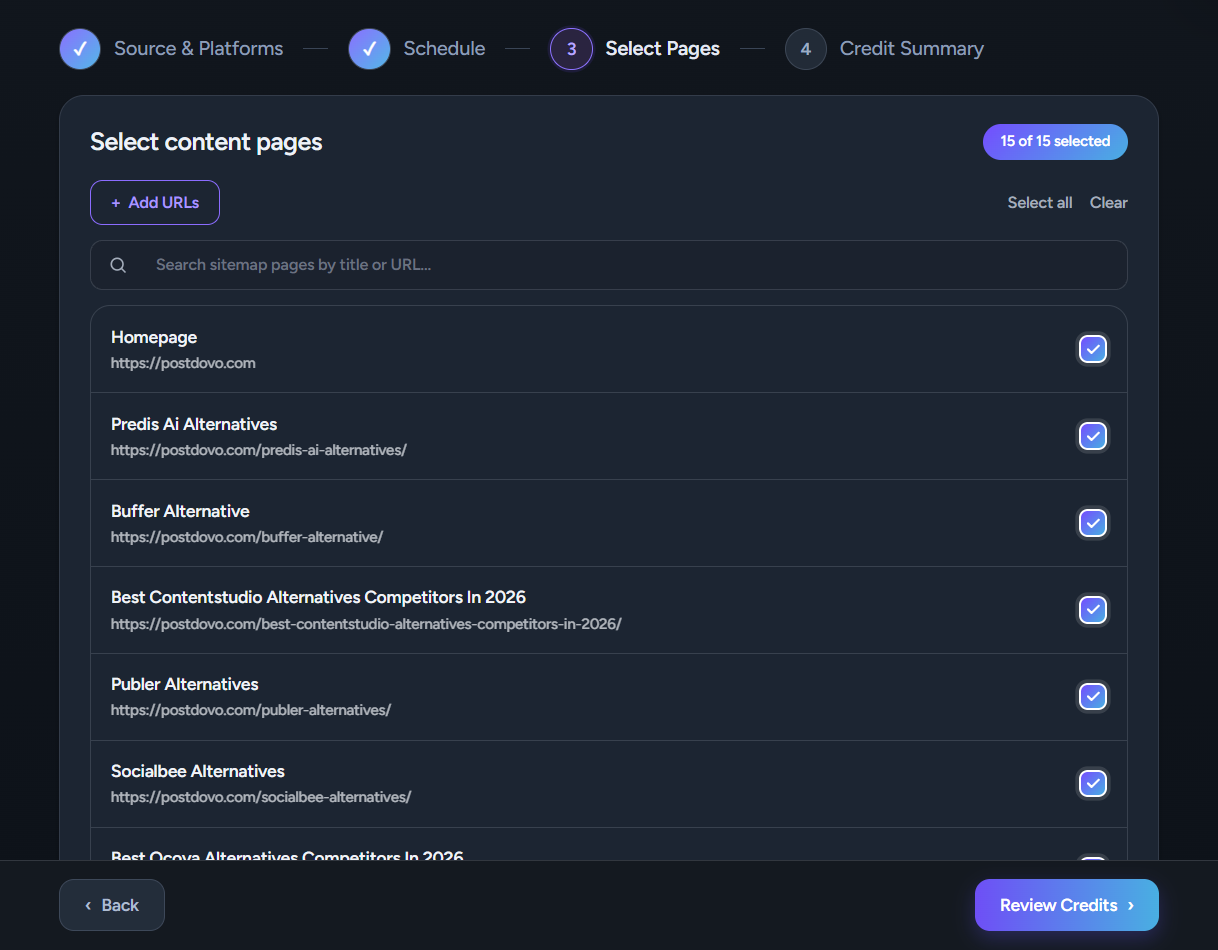
- Choose your source. Start with Website URL, then select or manually add the exact product URL in Select Pages.
- Choose the post format and channels. Select Text Only, Text + Image, or an available carousel format, and choose the connected accounts where the content belongs.
- Choose the visual source. Select Scrape Website Images when customers need to see the real item. Brand-aware AI visuals may suit conceptual or lifestyle ideas, but verify they do not misrepresent the product.
- Set the publishing plan. Pick the campaign duration and posting days, then review the total posts and any displayed usage before generation.
- Review each draft. Compare names, features, colors, images, and links with the live page. Edit the text and media, preview each platform version, and schedule or publish only after it is ready.
PostDovo can develop several angles from a selected page when the campaign calls for more than one post. The output remains a draft to check. A product’s price, stock, variants, and claims can change after the page was read. See the full campaign workflow for the current options.
Want to try a product page first? PostDovo’s guest workflow currently offers up to four Text Only or Text + Image posts without signup. It uses Website URL and lets you select product pages. Connecting a social account is part of trying the publishing flow; carousel generation is restricted in guest access.
Product-post quality checklist
Run through this list before scheduling any generated or manually written product post:
- Product identity: Does the name, model, color, size, and variant match the listing?
- Claim accuracy: Can you point to the page or other reliable evidence for each performance, safety, compatibility, or durability claim?
- Visual accuracy: Is the item in the image the one the customer can buy? Have you checked rights and any required permissions?
- Buying details: Are price, discount, shipping, and stock statements current? If they change often, leave them on the live product page.
- Destination: Does the link open the correct product page and variant on mobile? If you add tracking parameters, make sure the page still loads properly.
- Platform fit: Does the image crop, caption length, link placement, and CTA make sense for the channel?
- Customer value: Does the post explain one useful thing beyond “buy now”?
The checklist also makes review faster for a catalog. Keep a reusable product fact sheet for each item, then update it whenever the listing or inventory changes.
What if the product URL produces weak posts?
| Problem | Likely cause | What to do |
|---|---|---|
| Generic captions | The page has little specific information | Add verified benefits, dimensions, use cases, FAQs, and clearer photos to the listing |
| Wrong photo or variant | The page contains multiple images or variant defaults | Select or replace the media; check the linked variant before scheduling |
| Incorrect feature claim | Draft inferred more than the source proves | Remove or rewrite the claim using only supported facts |
| Page cannot be analyzed | Login, blocking, broken URL, or limited public page content | Use a publicly accessible listing; add the exact URL manually in Select Pages if discovery missed it |
| Every post sounds the same | All drafts use the same promotional angle | Assign distinct jobs: use case, question, demonstration, feature, and care tip |
For a large catalog, begin with one high-quality product page and a few different angles. That gives you a useful standard for checking subsequent products.
The product page is your starting brief
Choose a specific product URL, extract facts a customer can verify, and create a few posts that answer different questions. Use the real item in the visual when its appearance matters. Then review each draft against the live listing and send interested people to that exact page.
PostDovo can help turn the selected product page into a campaign, while you keep the final say over the claims, imagery, and publishing schedule.
Frequently asked questions
Can I create social media posts from a product URL automatically?
Yes. A URL-based campaign tool can use product-page content to draft social posts. In PostDovo, choose Website URL, select or manually add the product page, then generate and review the drafts. Check every claim, image, and link before publishing.
Can one product URL create multiple posts?
Yes. The same page can support different posts about a use case, feature, common question, care instruction, or visual idea. PostDovo can revisit selected pages to create additional angles when the campaign calls for more posts.
Does PostDovo have a separate Product URL source option?
The current Generate Campaign page presents Website URL and Topic / Niche as source choices. For a specific product, choose Website URL, then select the product page or add its exact URL manually in Select Pages.
Can I use photos from the product page?
Yes, when you have the rights to use them. PostDovo offers a Scrape Website Images option, which is useful when the post needs to show the actual product. Always check that the selected photo matches the variant being promoted.
Can I make product posts from a Shopify or WooCommerce URL?
A public product page from either type of store can serve as the source page in a website-based workflow. Check that the exact listing is accessible and selected; the quality of the output depends on the information and images the page exposes.
Should a social post include the current product price?
Only if you can keep it accurate through the post’s publishing date and any promotion terms. For products with frequent price or stock changes, describe a stable benefit and let the linked product page show current details.
Can I try product-page post generation for free?
PostDovo’s guest campaign currently allows up to four Text Only or Text + Image posts without signup using Website URL as the source. Guest format and usage limits apply; the publishing test uses a connected social account.
Will a product URL create a finished TikTok or Reel?
The product page can inform a short script and caption, but a convincing video needs suitable footage or another supported video production workflow. Check the available campaign format before expecting a finished video.