
Manage Multiple Brands and Clients With Separate Social Media Workspaces
Managing several businesses becomes difficult when social accounts, campaigns, posts, analytics and publishing schedules are mixed together. PostDovo Workspaces give each brand or client its own independent environment—with separate content, performance data and a dedicated publishing timezone, all managed from one PostDovo account.
Keep Every Client’s Social Accounts and Content Separate
Every workspace has its own connected social accounts, generated campaigns, posts and publishing records. Content belonging to one workspace cannot be accessed through another workspace in PostDovo.
One Account, Multiple Independent Businesses
Create a dedicated workspace for every brand, business or client instead of placing unrelated social media activity in one shared environment. Each workspace has its own context when you connect accounts, generate campaigns or schedule content.
London Fashion Brand
Its own social accounts, campaigns, drafts, scheduled and published posts, analytics and Europe/London timezone.
New York Restaurant
Separate social connections, posts, publishing history, performance data and America/New_York timezone.
Campaigns and Publishing Records Stay With Their Workspace
Campaigns created with PostDovo Generate Campaign remain in the workspace where they were generated. The Campaign Library, Draft Posts, Scheduled Posts and Published Posts views show records belonging to the selected workspace.
Review Separate Analytics and Dashboard Statistics
Workspace separation includes performance reporting—not only posts and connected accounts. Every workspace has its own Analytics view and publishing statistics.
Independent Social Media Analytics
The Analytics section shows available channel-level and post-performance information for the social accounts connected to the currently selected workspace. Analytics from another workspace are not accessible through it.
Workspace-Specific Dashboard
The Dashboard gives you a quick overview of that business’s publishing activity, including:
Published This Month
Posts published during the current month.
Scheduled & Drafts
Posts waiting to publish and content saved for later.
Active Campaigns
Campaigns currently active in the selected workspace.
Upcoming Posts & Campaigns
Content and campaigns with scheduled publishing activity.
When you change workspaces, you see the selected business’s social media analytics and Dashboard statistics—not combined figures from unrelated clients.
Schedule Posts in Each Client’s Local Timezone
An agency can manage clients in different countries without applying one universal timezone to every publishing schedule. Each workspace has its own default publishing timezone.
One Agency, Two Local Publishing Schedules
London Fashion Brand
Timezone: Europe/London
Scheduled time: 9:00 AM London time
New York Restaurant
Timezone: America/New_York
Scheduled time: 9:00 AM New York time
Both clients can publish at 9:00 AM in their own local time, regardless of where the agency team is located. PostDovo uses each workspace’s configured timezone to interpret its scheduled posting times.
Suggested Posting Times Use the Same Timezone
PostDovo can recommend posting times using previous post-performance information. Those suggested times appear in the timezone of the selected workspace. A 10:00 AM suggestion in the London workspace means 10:00 AM London time; a 10:00 AM suggestion in the New York workspace means 10:00 AM New York time.
Scheduled individual posts and complete campaigns follow that same workspace timezone.
Create, Switch, and Manage Workspaces Easily
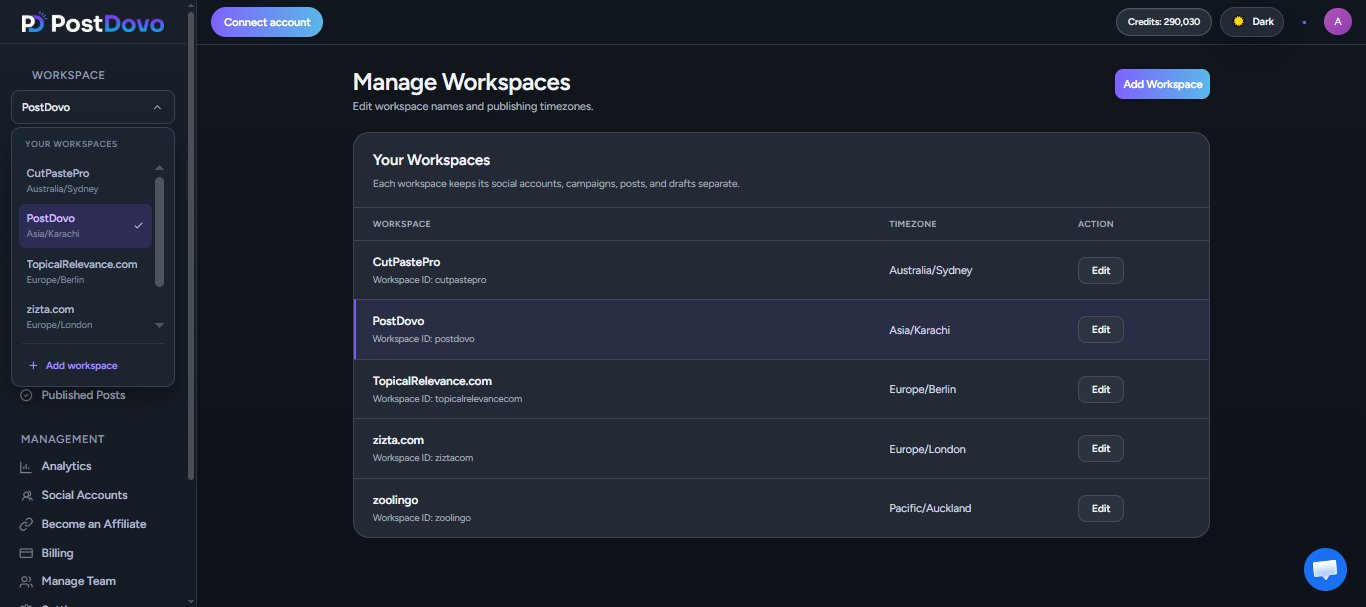
Create and switch workspaces directly from the application sidebar. Use the Profile menu’s Manage Workspaces page when you want to edit or delete an existing workspace.
Create a Workspace
- Open the Workspace dropdown.
- Click Add workspace.
- Enter a Workspace name.
- Select the Timezone.
- Click Create workspace.
Switch Between Businesses
Open the Workspace dropdown and choose the workspace you want to manage. PostDovo presents that business’s own accounts, campaigns, posts, analytics and statistics.
There’s no need to log out and sign into another PostDovo account.
Edit or Delete Existing Workspaces
Open your Profile menu, choose Manage Workspaces, and use the available management controls for the workspace you want to edit or delete. Workspace details, including its name and timezone, can be updated there.
The number of workspaces available depends on your PostDovo subscription plan.
View the Same Publishing Schedule in Another Timezone
Workspace scheduling and Calendar viewing have different purposes. The Publishing Calendar lets you review scheduled posts in another timezone without changing when they will publish.
Workspace Timezone
Sets the reference used for recommended posting times and scheduled posts or campaigns.
Calendar Timezone
Changes how the existing scheduled times are displayed in the Publishing Calendar.
Example: Review a London Client’s Schedule From New York
A London client’s workspace uses Europe/London for scheduling. A team member in New York can change the Calendar viewing timezone to America/New_York to see the equivalent local times. The posts remain scheduled for the same original publishing moments.
It also does not expose social accounts, campaigns or other content belonging to different workspaces. The Calendar still shows the selected workspace’s activity.
Manage Multiple Clients Without Mixing Their Social Media Operations
Each client may have different branding, campaigns, audience locations and performance goals. Workspaces keep those day-to-day operations distinct while allowing you to oversee them from a single account.
Keep Each Brand Organized
Use separate social accounts, campaigns, draft content and publishing records for each business.
Review Client Results
See analytics and Dashboard statistics for the selected client’s connected accounts.
Publish at Local Times
Follow the workspace timezone for suggested posting times and scheduled campaigns.
Switch Without Disruption
Move from one business to another using the sidebar Workspace selector.
Manage Multiple Brands With PostDovo Workspaces
Keep every client’s social accounts, campaigns, posts, analytics and publishing schedule separate, with local-time scheduling for each business—all from one PostDovo account.
Start Managing Your WorkspacesFrequently Asked Questions
What is a social media workspace in PostDovo?
A workspace is an independent environment for a business, brand or client, with its own connected social accounts, campaigns, posts, analytics, Dashboard statistics and publishing timezone.
Can I manage multiple clients from one PostDovo account?
Yes. Create and switch between multiple workspaces from one account. The number of available workspaces depends on your subscription plan.
Are social accounts, campaigns and posts shared between workspaces?
No. Each workspace has its own connected accounts, generated campaigns, and draft, scheduled and published posts. Those records cannot be accessed through another workspace.
Are social media analytics separate for each workspace?
Yes. Available channel-level and post-performance analytics, as well as Dashboard statistics, belong to the selected workspace and are not accessible through another workspace.
Can each workspace have a different timezone?
Yes. Every workspace can have its own default timezone for suggested posting times and scheduled posts or campaigns.
Can I view scheduled posts in another timezone without rescheduling them?
Yes. Changing the Publishing Calendar viewing timezone changes how scheduled times are displayed, not when the posts will actually publish.
How do I create a workspace?
Open the sidebar Workspace dropdown, select Add workspace, enter a name, choose a timezone and click Create workspace.
How do I switch between workspaces?
Select the workspace you want from the sidebar Workspace dropdown. The application then shows that business’s own accounts, campaigns, posts, analytics and statistics.
How do I edit or delete an existing workspace?
Open the Profile menu and select Manage Workspaces to use the available edit or delete controls.
Do I need separate logins for different clients?
No. You can manage several client workspaces from one PostDovo account, subject to your plan’s workspace limits.