
See Your Entire Social Publishing Schedule in One Calendar
Managing social media becomes harder when posts are spread across different campaigns, connected accounts, platforms, dates and audience timezones. PostDovo’s Publishing Calendar brings that activity into one visual workspace, so you can see what is scheduled, focus on the accounts or campaigns that matter, and understand when each post is planned to go live.
One Calendar for Your Social Publishing Activity
A publishing calendar should do more than show dates. It should help you understand what is scheduled, which accounts are publishing, how campaigns are distributed, and when posts are planned to go live.
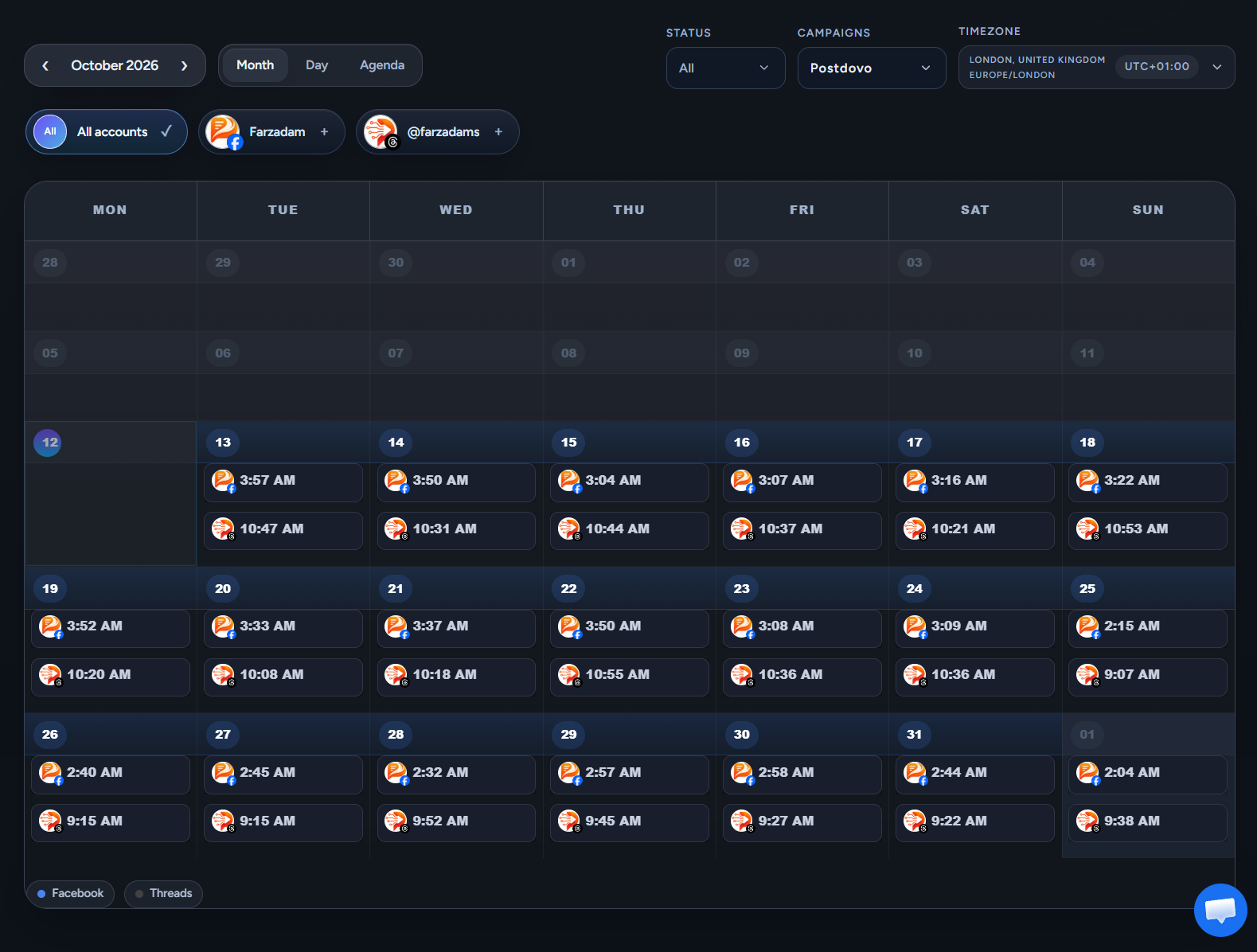
PostDovo brings connected social accounts and campaigns into one publishing view, helping you understand the complete schedule without checking each account separately.
See the Complete Publishing Schedule at a Glance
Each scheduled post appears on its publishing date with its time and account or platform identification, making it easier to understand the structure of your schedule without opening every post individually.
When multiple accounts are active, their publishing activity can appear together in the same calendar.
Multiple Accounts
See publishing activity from more than one connected social account in the same calendar.
Multiple Campaigns
Understand how different campaigns fit into the wider publishing schedule.
Different Platforms
Review scheduled social activity across the platforms connected to your workspace.
Publishing Times
See when posts are scheduled directly inside the relevant calendar dates.
Switch Between Month, Day, and Agenda Views
Different planning tasks need different levels of detail. Change how you review the schedule without changing the underlying publishing plan.
See the Bigger Picture
Use Month view to see which days contain scheduled content, how frequently you are publishing, and how activity is distributed across the month.
Focus on One Date
Use Day view when you want to concentrate on publishing activity for a specific date, launch, promotion or busy publishing day.
Review the Schedule Sequentially
Agenda view gives you a compact way to review scheduled activity without scanning a full calendar grid.
Filter by Account, Campaign, or Status
See everything when you need the full picture, then narrow the calendar when you need to focus on a particular part of the publishing operation.
Focus on a Social Account
Switch between All accounts and individual connected social accounts. Start with a workspace-wide view, then narrow the calendar to a specific account without leaving the page.
Focus on a Campaign
The Campaign filter lets you isolate the publishing activity for a specific campaign. This is useful when several campaigns overlap and you want to see how one campaign is distributed across the schedule.
Focus by Status
The calendar also includes a Status filter, allowing you to narrow the content shown according to the publishing activity you want to review.
Filter when you need focus.
See Multiple Social Platforms in One Schedule
Review publishing activity across connected social platforms without maintaining a separate mental schedule for each network.
Platform and account indicators help distinguish one scheduled post from another, while the platform legend gives you an additional visual reference.
This makes it easier to understand:
- Which platforms are publishing on a particular day
- How different accounts are distributed through the schedule
- Whether one network is receiving more activity than another
- How campaign content is spread across platforms
View Publishing Times in the Timezone You Need
Timezone handling becomes important as soon as clients, teams, brands or audiences operate across different regions.
PostDovo’s Publishing Calendar includes a Timezone selector so you can view the schedule from the location that matters to you.
The selected timezone can be identified using information such as:
- City
- Country
- Timezone region
- UTC offset
Scheduling Timezone vs. Viewing Timezone
Workspace Scheduling Timezone
The workspace has a default timezone that provides a consistent scheduling reference for posts.
Calendar Viewing Timezone
The Publishing Calendar can display those scheduled times in another timezone when you need to review the plan from a different location’s perspective.
This is particularly useful for:
- Agencies with international clients
- Remote teams
- Global brands
- Campaigns targeting audiences in different regions
Connect Campaign Creation With Ongoing Publishing
The Publishing Calendar sits naturally after content creation and scheduling, giving you a wider view of what happens once campaign posts are ready to go live.
A campaign may begin with website content, selected pages, products, articles or a Topic / Niche. Once those posts are created, reviewed and scheduled, the Publishing Calendar becomes the place where you can see how that campaign fits into the wider publishing plan.
This becomes increasingly useful as your publishing operation grows. A few scheduled posts are easy to remember. The challenge begins when you have multiple accounts, several platforms, overlapping campaigns, different publishing frequencies, different publishing times and audiences in different regions.
You can start broad with the full schedule, then narrow the view using:
A Clearer Way to Manage Social Publishing
A good social media workflow does not end when the content is generated. You still need a clear view of what is planned and how the schedule fits together.
You still need to know:
- When each post will be published
- Which account it belongs to
- Which campaign it is part of
- Which platform it is going to
- How the schedule looks over time
- How those times translate across regions
PostDovo’s Publishing Calendar brings those pieces together in one visual publishing workspace.
See Your Social Publishing Plan in One Place
Bring your scheduled posts, connected accounts, campaigns, platforms and publishing times into one clear calendar. Review the full picture when you need it, then narrow the schedule when you need focus.
Try PostDovo FreeWhat is the PostDovo Publishing Calendar?
The Publishing Calendar is a visual workspace for viewing and organizing social media publishing activity across connected accounts and campaigns.
Which calendar views are available?
PostDovo provides Month, Day and Agenda views so you can move between broad planning and more focused schedule review.
Can I see more than one social account in the calendar?
Yes. You can view publishing activity across connected accounts together or select an individual account when you want to focus on it.
Can I filter the calendar by campaign?
Yes. The Campaign filter lets you focus the publishing schedule on a specific campaign.
Can I filter by publishing status?
Yes. The Publishing Calendar includes a Status filter so you can narrow the content shown according to the publishing activity you want to review.
Can posts from different social platforms appear in the same calendar?
Yes. Posts from connected social accounts and supported platforms can appear together, with platform and account indicators helping you distinguish the scheduled content.
Can I see publishing times directly in the calendar?
Yes. Scheduled publishing times are displayed with the posts inside the calendar.
Can I change the calendar timezone?
Yes. The Publishing Calendar includes a timezone selector so you can view scheduled publishing activity in the timezone relevant to you.
Why is timezone viewing useful?
It is particularly useful for international clients, remote teams, global brands and campaigns targeting audiences in different regions.
Does the Publishing Calendar connect with Generate Campaign?
Yes. After campaign posts are generated, reviewed and scheduled, they become part of the wider publishing schedule that can be viewed through the Publishing Calendar.