
Single Post
Create one social media post, use it across multiple accounts, customize only where needed, preview the selected platform, and schedule or publish from one place.
PostDovo Single Post is now free for a limited time. Connect up to 5 social media accounts for free, create your posts, and manage them from one place. Regular PostDovo subscription prices have not changed.
You write one post. Then you open another social platform, copy the text, upload the same image again, make a small change, and repeat the process for the next account.
The content was ready from the beginning. The repetitive publishing work was the problem.
PostDovo Single Post removes much of that repetition. Start with one shared version, preserve your main Post Text and media, then customize individual accounts only when they need something different.
Create Your Social Media Post and Select Accounts
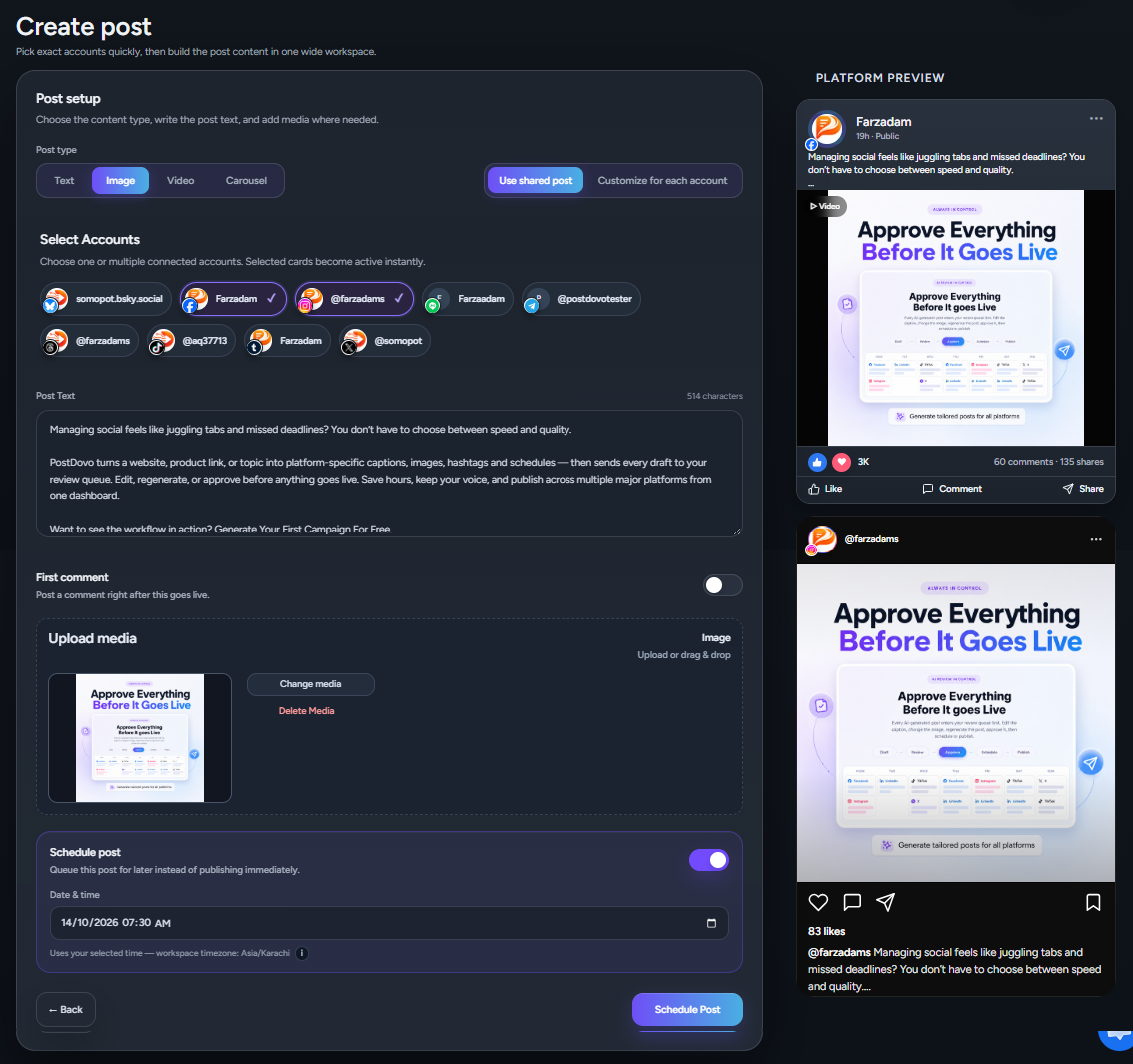
Start with the content you already want to publish, choose the post format, and select the social accounts where it should appear.
Choose Your Post Format
Not every social media update needs the same format. Choose the one that fits what you already want to share.
Text Post
Publish a straightforward social post when the written message is the main focus.
Image Post
Combine your Post Text with an image you want to share across your accounts.
Video Post
Prepare video content for supported social media accounts.
Carousel Post
Use multiple media items when the post needs more space to communicate the message.
Select One or Multiple Social Accounts
Choose the connected accounts where you want the post to appear.
You can prepare a post for one account or several selected social accounts from the same screen.
Limited-time offer: connect up to 5 social accounts for free and use Single Post without paying for post creation.
This is where Single Post starts saving time. Instead of rebuilding the same content for every destination, you decide how much should stay shared and how much should be customized.
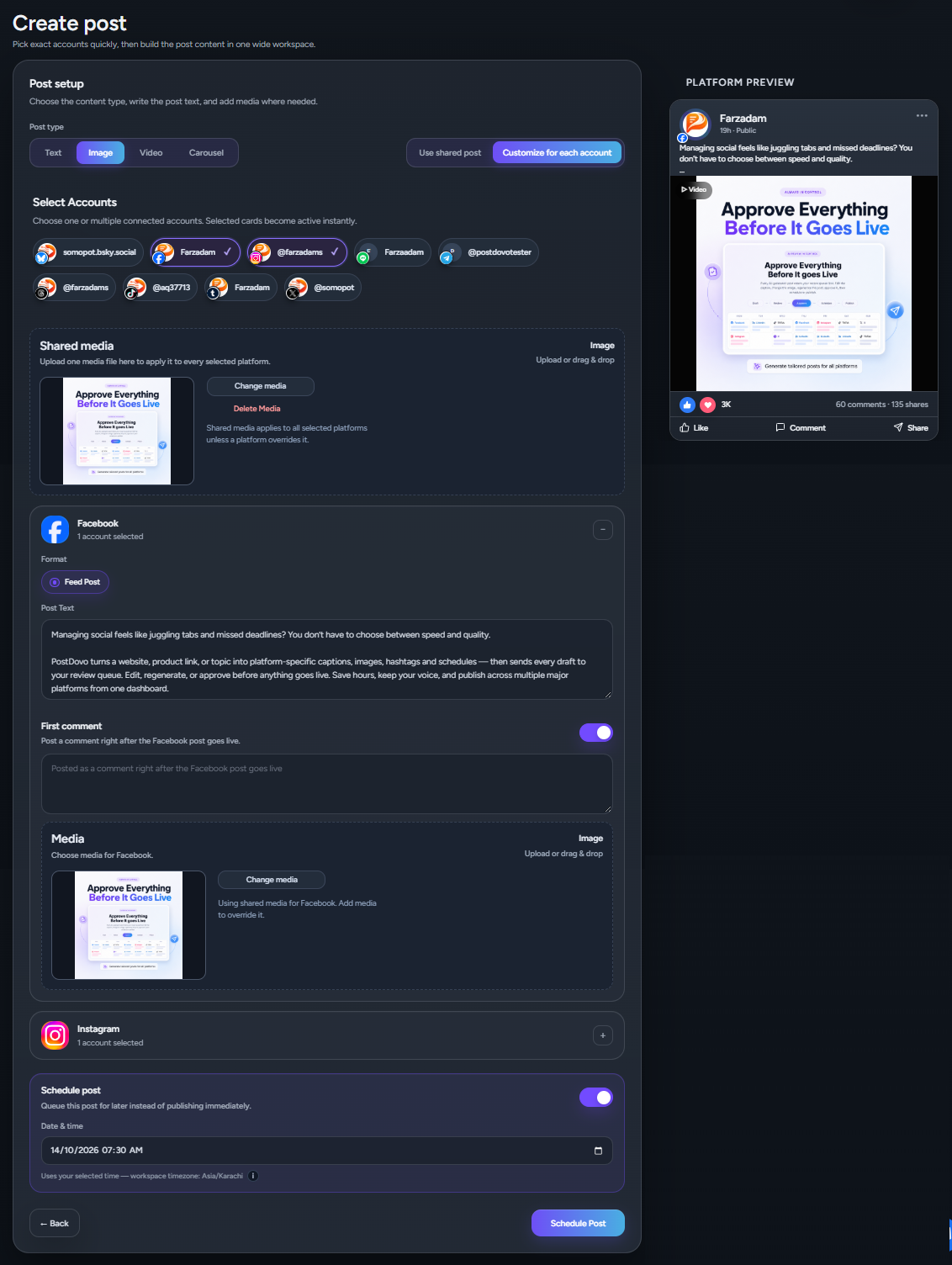
Use Shared Post when most of the content should stay the same, or switch to Customize for each account when a specific account needs its own version.
Create Once, Customize Only Where Needed
Keep the shared post as your base, then change only the accounts that need different wording, media or other post details.
Keep the Main Copy
Imagine you selected five accounts.
The shared Post Text works for four of them, but the fifth needs different wording.
You do not need five separate drafts. Keep the shared version for those four accounts and customize only the fifth.
Keep the Media — or Override It
The same idea applies to media.
Use shared media across the selected accounts when the same image, video or visual works everywhere.
If a particular account needs something different, override the media for that account without rebuilding the rest of the post.
Customize the First Comment
The first comment can also be prepared while working on the post.
If a specific account needs a different first comment, customize that version while leaving the other accounts unchanged.
You keep the speed of shared publishing without forcing every destination to receive an identical version.
Preview the Post for the Selected Platform
See the current Post Text and media in a platform preview while you create or customize the post.
When you are preparing content for several social networks, seeing the post before it goes live matters.
PostDovo shows a Platform Preview on the right side of the Single Post screen based on the selected social platform or account.
Create on the Left, Preview on the Right
As you work on your Post Text and media, review them together without leaving the creation screen.
That makes it easier to catch something that needs changing before the post goes live.
Preview Account-Specific Changes
The preview becomes especially useful when you switch to Customize for each account.
Select an account, change its Post Text or media, and review that specific version on the right.
Then move to another account only if it needs attention.
Keep Media and First Comments in the Same Workflow
Add Shared Media Once
If the same media works across your selected accounts, add it once as shared media.
Override Media Only When Necessary
If one account needs a different visual, customize only that account instead of uploading everything again.
Prepare the First Comment Before Publishing
Add the first comment while preparing the post instead of treating it as another task to remember later.
Schedule or Publish Your Social Media Post
Publish when the post is ready, or prepare your future social content in advance with unlimited scheduling.
You are not always creating a post at the exact moment you want it published.
Maybe you are preparing tomorrow’s content. Maybe you want to work through several posts in one sitting. Or maybe you prefer planning your social media activity ahead.
Schedule Social Media Posts Without Limits
PostDovo lets you schedule unlimited manually created Single Posts.
There is no scheduling limit forcing you to decide which manually created posts deserve a place in your queue.
Build Your Publishing Queue Ahead of Time
Create the content when it is convenient for you and schedule it for when you want it to go live.
Instead of returning to each social network every time something needs to be published, you can prepare your content while you have time.
Publish Now or Schedule for Later
Some posts need to go out immediately. Others belong in your future publishing schedule.
Single Post supports both everyday publishing workflows without forcing you to rebuild the content.
Unlimited Single Posts — Free for a Limited Time
For a limited time, create Single Posts for free and connect up to 5 social accounts at no cost. Manually created Single Posts remain unlimited and do not consume AI generation credits.
Single Post is different from credit-based content generation.
You write the Post Text yourself, so manually created Single Posts are not tied to AI generation credits.
That means Single Post creation is unlimited across every PostDovo plan.
Scheduling is unlimited too.
Publishing is unlimited across supported platforms, with X as the exception.
If you already know what you want to say, PostDovo gives you a practical multi-platform publishing and scheduling workflow without charging AI generation credits simply because you create another manual post.
Limited-Time Free Offer and Regular PostDovo Pricing
For a limited time, Single Post creation is free, and you can connect up to 5 social accounts for free. This is a promotional offer, not a permanent change to the subscription plans or their prices.
The regular Starter plan is $5/month and supports up to 5 connected social accounts. The standard plan prices remain exactly as listed below.
| Plan | Monthly Price | Social Accounts | Single Posts | Scheduling | Publishing |
|---|---|---|---|---|---|
| Starter | $5/month | Up to 5 | Unlimited | Unlimited | Unlimited except X |
| Creator | $39/month | Up to 10 | Unlimited | Unlimited | Unlimited except X |
| Business | $97/month | Up to 30 | Unlimited | Unlimited | Unlimited except X |
| Agency | $149/month | Unlimited | Unlimited | Unlimited | Unlimited except X |
Connect Up to 5 Social Accounts Free for a Limited Time
For a small business, creator, consultant, freelancer or local brand, five social accounts may already cover the platforms they actively use.
During the limited-time offer, you can connect up to five social accounts for free and create Single Posts at no cost. The regular Starter plan remains $5/month, as shown above.
You are not pushed into a larger plan simply because you want to publish more frequently.
Single Post vs Generate Campaign: Which Should You Use?
Both PostDovo workflows help you publish across social media, but they solve different problems. The easiest way to choose is to look at how much of the content you already have.
You Already Have the Content
Use Single Post when you already have the message, media or idea and need a faster way to prepare, customize, preview, schedule and publish it. For a limited time, post creation and up to 5 account connections are free.
You Need the Campaign Built
Use Generate Campaign when you want PostDovo to analyze source material and turn it into a complete social media campaign.
Compare the Two Workflows
| Feature | Single Post | Generate Campaign |
|---|---|---|
| Best for | When you already have the message, media or idea and want to publish it efficiently. | When you want PostDovo to turn source content or an idea into a complete social media campaign. |
| Starting point | Your own Post Text, image, video or carousel. | Website, selected web pages, products, articles, topic or niche. |
| Content creation | You create the main post yourself. | PostDovo analyzes the source before creating campaign content. |
| Multiple social accounts | Create one shared post and use it across selected accounts. | Generate campaign content for the selected social accounts. |
| Platform customization | Keep the shared version and customize individual accounts only where needed. | PostDovo creates platform-specific Post Text according to the destination platform. |
| Media | Add shared media and override it for specific accounts when necessary. | Use real website images or create brand-aware visuals based on the source and brand context. |
| Preview and review | Preview the selected platform while creating or customizing the post. | Review generated campaign posts before scheduling or publishing. |
| Scheduling | Unlimited scheduling for manually created Single Posts. | Build a publishing schedule around the complete campaign. |
| AI credits | Manually created Single Posts do not consume AI generation credits. | Campaign generation can use credits for content, website image fetching or image generation depending on the campaign setup. |
| Typical use | Business update, promotion, announcement, article share or everyday social post. | Product campaign, website campaign, blog repurposing, service campaign or topic-based campaign. |
Use Single Post When Your Content Is Already Ready
If you already have the message, image, video or idea, Single Post gives you the shorter route.
Use Generate Campaign When You Need the Content Built
Generate Campaign goes further. PostDovo can analyze a website, selected pages, products, articles, topics or niches and turn that source material into a complete social media campaign with platform-specific Post Text and visuals.
Want to see the complete workflow? See how Generate Campaign works →
Your first campaign is free, and you can generate it without signing up.
Generate Your First Campaign FreeA Simpler Way to Handle Everyday Social Media Publishing
Skip the repetitive copying, uploading and rebuilding when most of your post is already ready to publish.
One Base Post. Multiple Accounts.
Create the main version once. Use it across the accounts where it works. Customize individual versions where it does not.
Preview Before You Publish
Review the selected platform while you edit so you can make adjustments before the post goes live.
Schedule as Much as You Need
Build your future publishing queue without a scheduling limit on manually created Single Posts.
Start Free With Up to 5 Social Accounts
For a limited time, create Single Posts for free and connect up to five social media accounts at no cost. The standard subscription prices remain unchanged.
Can I post to multiple social media accounts at once?
Yes. PostDovo Single Post lets you select multiple connected social accounts and prepare the post for them from the same workflow.
Can I use the same post on several social platforms?
Yes. Use Shared Post to prepare the main Post Text and media once for your selected accounts.
Can I customize one account without changing the others?
Yes. Switch to Customize for each account and edit only that account while keeping the shared version for the others.
Do I have to recreate the post when I customize an account?
No. Your shared Post Text and media remain the base. You only change what needs to be different.
Can I use the same image with different Post Text?
Yes. Shared media can stay the same while you customize the Post Text for specific accounts.
Can I use different media for one social account?
Yes. Shared media can be used as the starting point while an individual account uses its own media override.
Can I preview a social media post before publishing?
Yes. PostDovo displays a Platform Preview on the right based on the selected social platform or account.
What types of posts can I create?
Single Post supports Text, Image, Video and Carousel post formats.
Can I add a first comment?
Yes. A first comment can be prepared as part of the Single Post workflow.
Is PostDovo Single Post free?
Yes. For a limited time, you can create Single Posts for free. This is a promotional offer; regular PostDovo plan pricing remains unchanged.
How many social media accounts can I connect for free?
You can connect up to 5 social media accounts for free during the limited-time Single Post promotion.
Is the free Single Post offer permanent?
No. This is a limited-time promotional offer. The standard subscription prices have not changed.
How many Single Posts can I create?
There is no limit on manually created Single Posts. They are unlimited across PostDovo plans.
Is there a limit on social media scheduling?
No. Scheduling manually created Single Posts is unlimited.
Is publishing unlimited?
Publishing is unlimited across supported platforms, with X as the exception.
Do manually created Single Posts use AI credits?
No. When you create the post yourself, manually created Single Posts do not consume AI generation credits.
How much does PostDovo cost for basic social media publishing?
The regular Starter plan remains $5/month and supports up to 5 social accounts, with unlimited manually created Single Posts and unlimited scheduling. Separately, for a limited time, Single Post creation and up to 5 connected accounts are free.
What is the difference between Single Post and Generate Campaign?
Single Post is designed for content you already create yourself. Generate Campaign analyzes a website, selected pages, products, articles, topics or niches and builds a complete social media campaign from that source.
Create Single Posts Free — Limited-Time Offer
Connect up to 5 social accounts for free, create your Single Posts, customize what matters, preview each account, and schedule your content. Regular plan pricing is unchanged.
Create a Free Single Post